Process Insights
OCT’25-DEC’25
Led the design and strategy for Process Insights, an AI-powered process mining feature that automatically maps key business workflows and help identify bottlenecks.
3hrs → 5min
Process Insights:
Seeing the forest, not just the trees
How we discovered that customers weren't just tracking users, they were trying to track the life of a business entity, end to end, across time.
ORIGIN
01
A customer said something that changed everything
Product analytics tools are built around a central question: what are users doing? But one customer asked something different. They didn't want to track a user — they wanted to track a loan application. They needed to see every stage it passed through, every person who touched it, and exactly how long it sat waiting at each step.
It wasn't a funnel. It was a process. And no tool in their stack could show it to them.
"We don't need to track who's using the system — we need to track what's moving through it."
That single customer ask lit up a hypothesis: Whatfix's unique position — the only platform that does both analytics and digital adoption — made it ideally suited to not just show what's happening in a process, but to fix it. This was the seed of Process Insights.
DISCOVERY
02
Learning a new language: business process
This was a new problem space. Before talking to users, I started with a literature review — tracing how process analysis has been practiced in industry, from BPN diagrams to modern process mining tools. This context was critical: it revealed a language gap between how engineers talk about process and how business operators experience it.
It wasn't a funnel. It was a process. And no tool in their stack could show it to them.
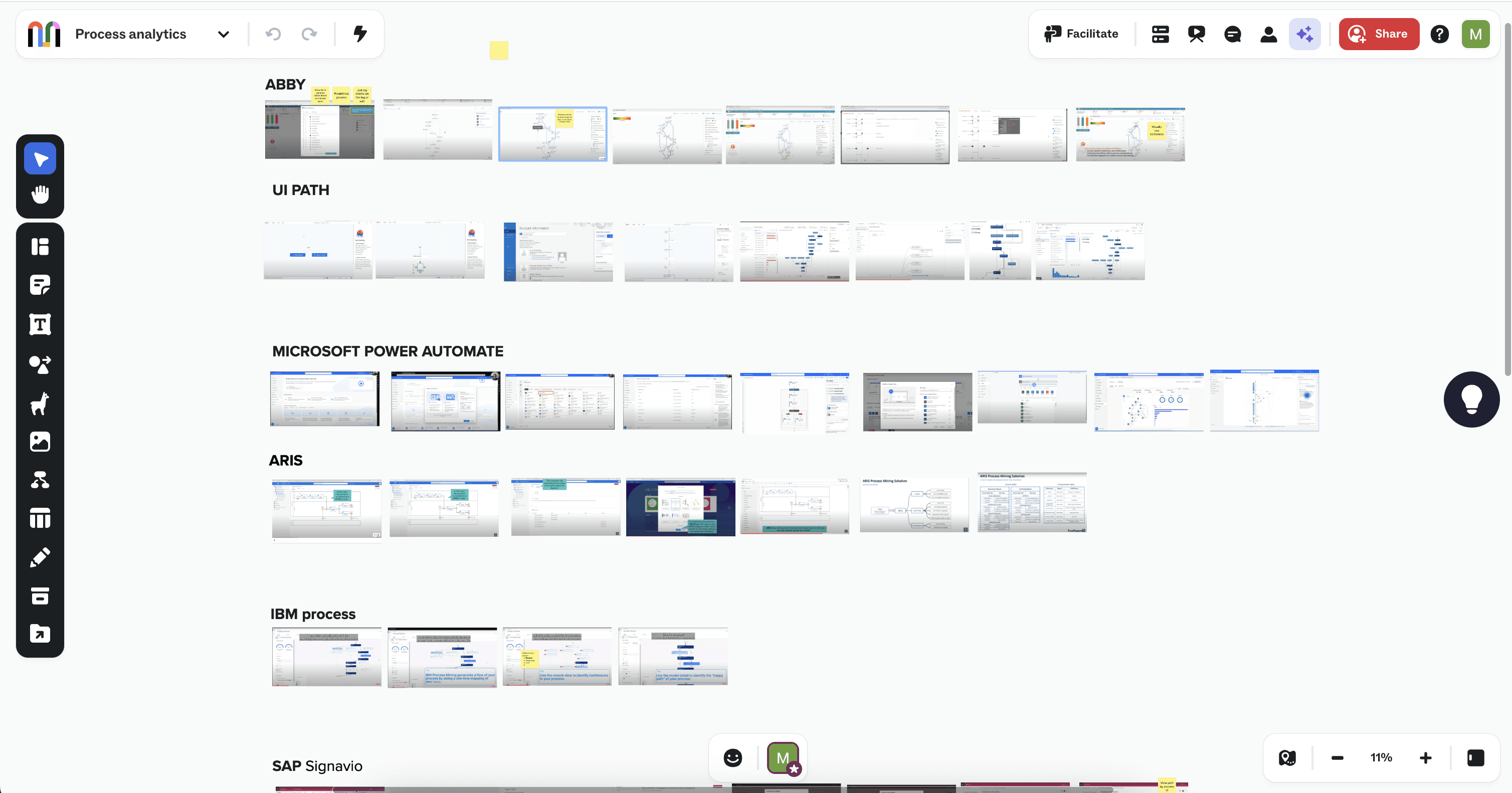
Competitive analysis followed. I surveyed tools in the process analytics and process mining space — Celonis, Signavio, and others. What became clear was the white space: none of them combined native analytics with the ability to push in-app guidance at the moment a bottleneck is identified. Whatfix was uniquely positioned.
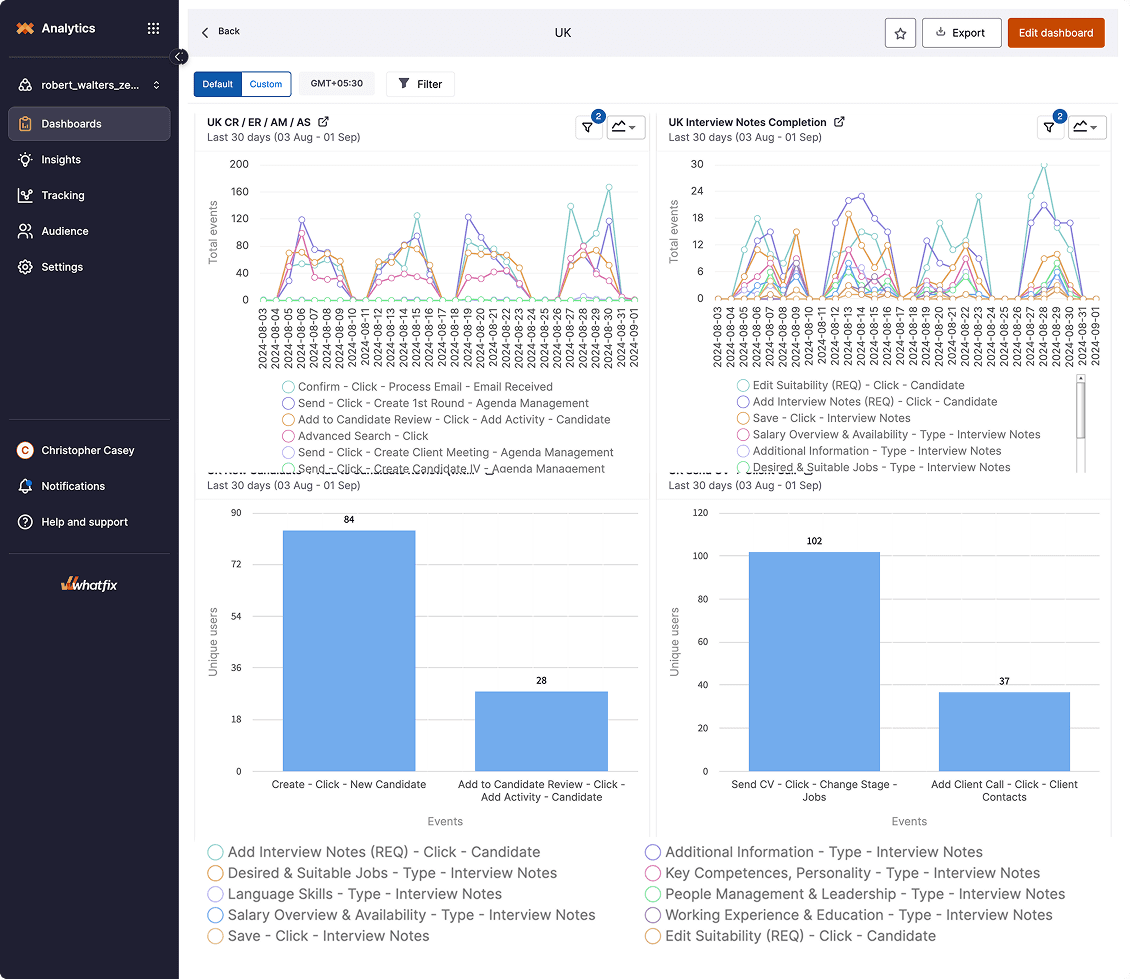
I also audited existing customer dashboards inside Whatfix. A recurring pattern stood out: customers had stitched together multiple funnel charts on a single dashboard as a workaround to approximate process-level visibility. That pattern was a signal — and validation that the need was real, active, and already being hacked around.
RESEARCH
03
Seven conversations that shaped the direction
We ran in-depth interviews with 7 users across industries — recruitment, pharma, finance, manufacturing, and contract management. The goal was to understand what process meant to each of them, not impose our definition.
07
users interviewed across industries
Mixed
methods: interviews + concept testing
05
distinct problem themes surfaced
Customer #1
Needs to track each candidate's complete journey — not who touched them, but what happened to them at each stage.
Customer #2
Current analytics only show the user who made a change, not the affected candidate. The entity is invisible.
Customer #3
Tracking patient journeys across hospitals to uncover delays and miscommunications impacting care.
Customer #4
Wants to map CPQ complexity — branching paths, time taken per stage — to find and eliminate bottlenecks.
Customer #5
Needs to see when users deviate from the ideal contract workflow and measure the cost of those deviations.
Customer #6
Verifying that credit package actions align with Reg B compliance — gaps are invisible in current tooling.
Three KPIs emerged as universal across all participants:
Process completion rate, Average time to complete,Bottleneck identification, Rework / back-and-forth steps
PROBLEM DEFINATION
04
Re-framing the problem
With research in hand, I defined the problem statement to anchor the design work. It had to capture both the business stakes (compliance, efficiency) and the human stakes (uncertainty, manual labor, assumptions).
"How might we help customers identify inefficiencies, optimize workflows, and ensure compliance across critical business operations through actionable process insights?"
We also mapped the jobs to be done the real goals users bring to this tool, regardless of features:
Get a bird's-eye view of where issues exist in a process — without digging through multiple reports
Create an accurate process map with minimum friction, so the setup cost doesn't outweigh the insight value.
See insights emerge in real time as the map is being built — not after a lengthy configuration phase.
Identify which event signals a meaningful stage transition — and not get overwhelmed by low-signal noise.
DESIGN
05
Designing for 3 moments in a process lifecycle
Rather than jumping straight to screens, I mapped the user's relationship with process analytics into three distinct moments. Each needed a different design response.
STEP 1
Map
Define the current state. Create the process structure, set ideal paths, and establish endpoints
STEP 2
Analyze
Compare as-is to as-expected. Find bottlenecks, apply filters, and explore deviations.
STEP 3
Act
Take decisions. Create cohorts, launch DAP content, or set system-suggested interventions.
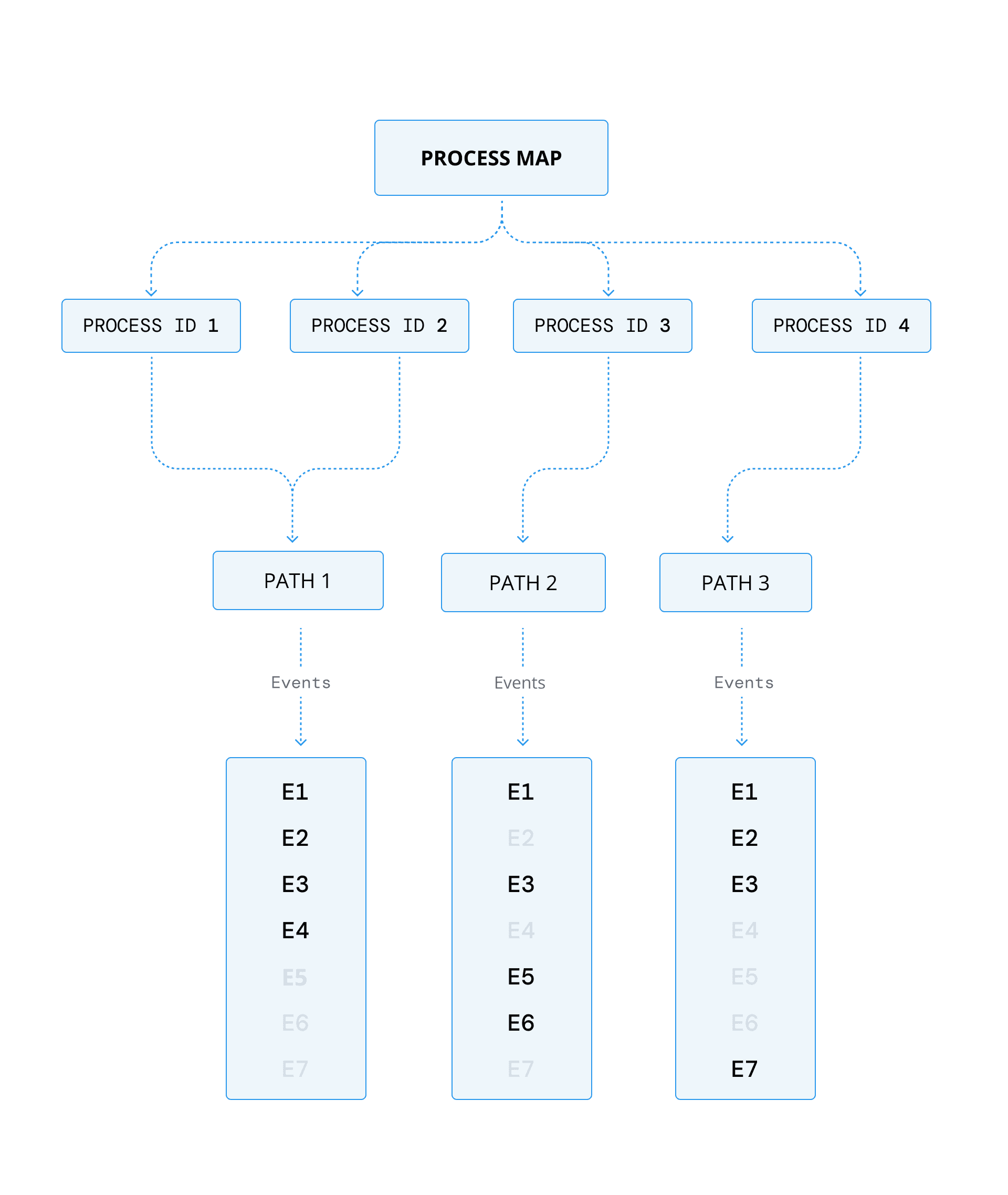
The toughest design question in Stage 1 was the visualisation itself. I explored whether to extend existing charts — funnels or Sankey charts — or build something new. The key insight came from understanding the nature of processes: they're often non-linear. Funnels assume a fixed sequence. Real processes branch, loop, and backtrack.
The answer was a flowchart-based model — free-flowing enough to represent non-linear processes, structured enough to anchor metrics to each node.
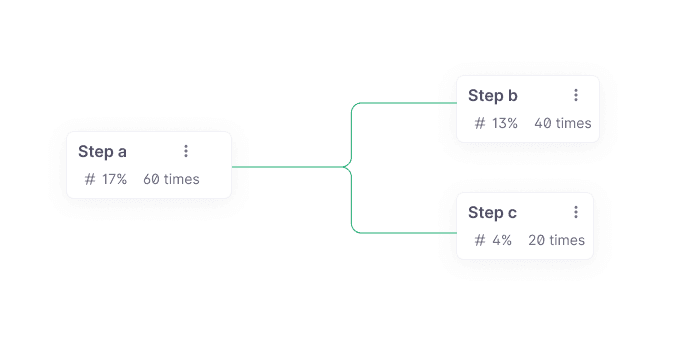
For each step in the visualisation, I identified the key metrics users would need to make decisions — not a comprehensive data dump, but the minimal set that answers the core questions: how many entities reached this stage, how long did they wait, and where did they go next?
KEY SCREENS
06
Shaping up the initial concept
The first concept was built around four core screens. Each screen answered a specific user question, in the sequence they would naturally ask them.
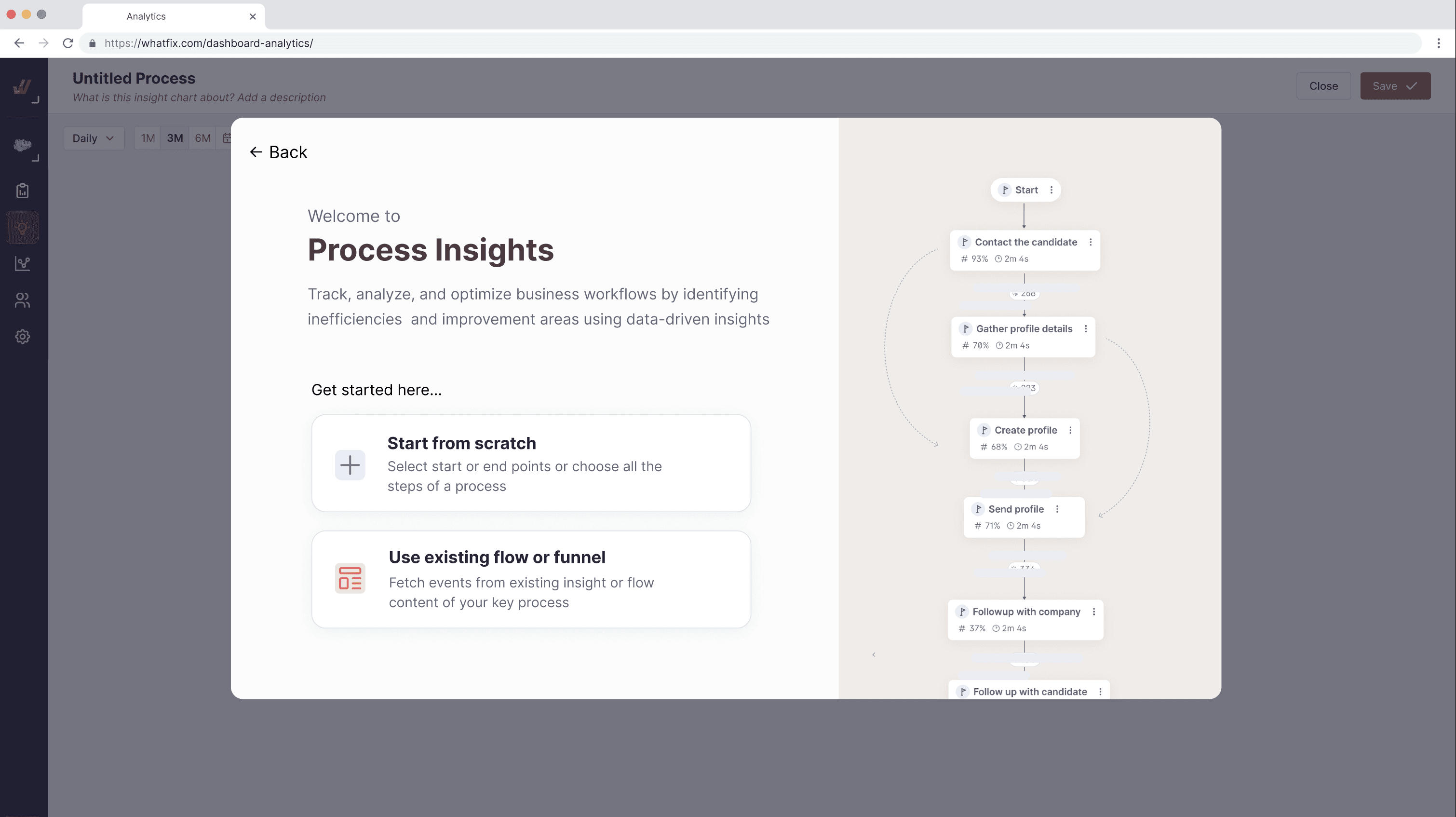
Screen 1: Process list — all configured processes, status indicators, quick-access to each
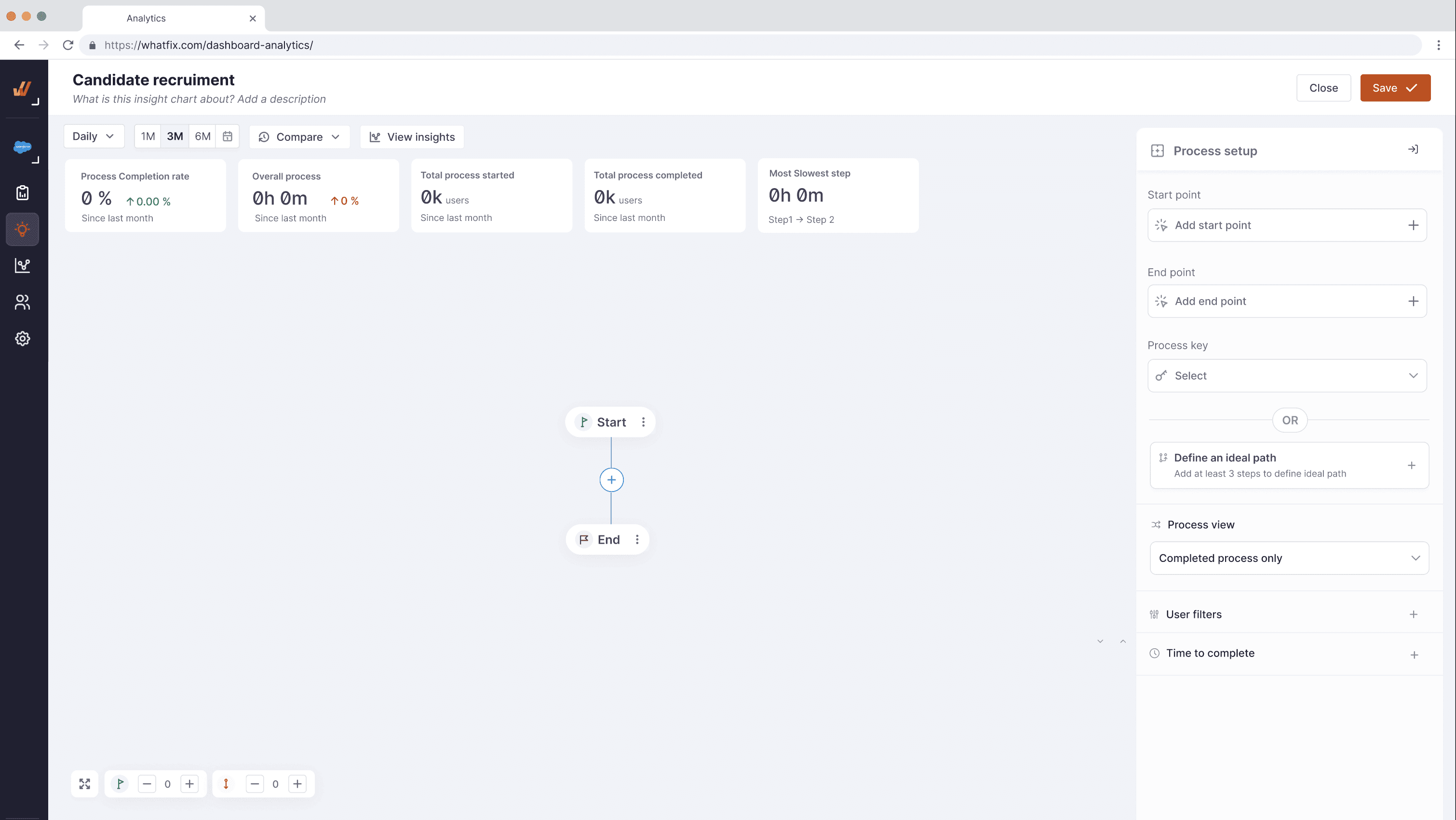
Screen 2: Process view — the full flowchart with per-node metrics visible, most common path highlighted
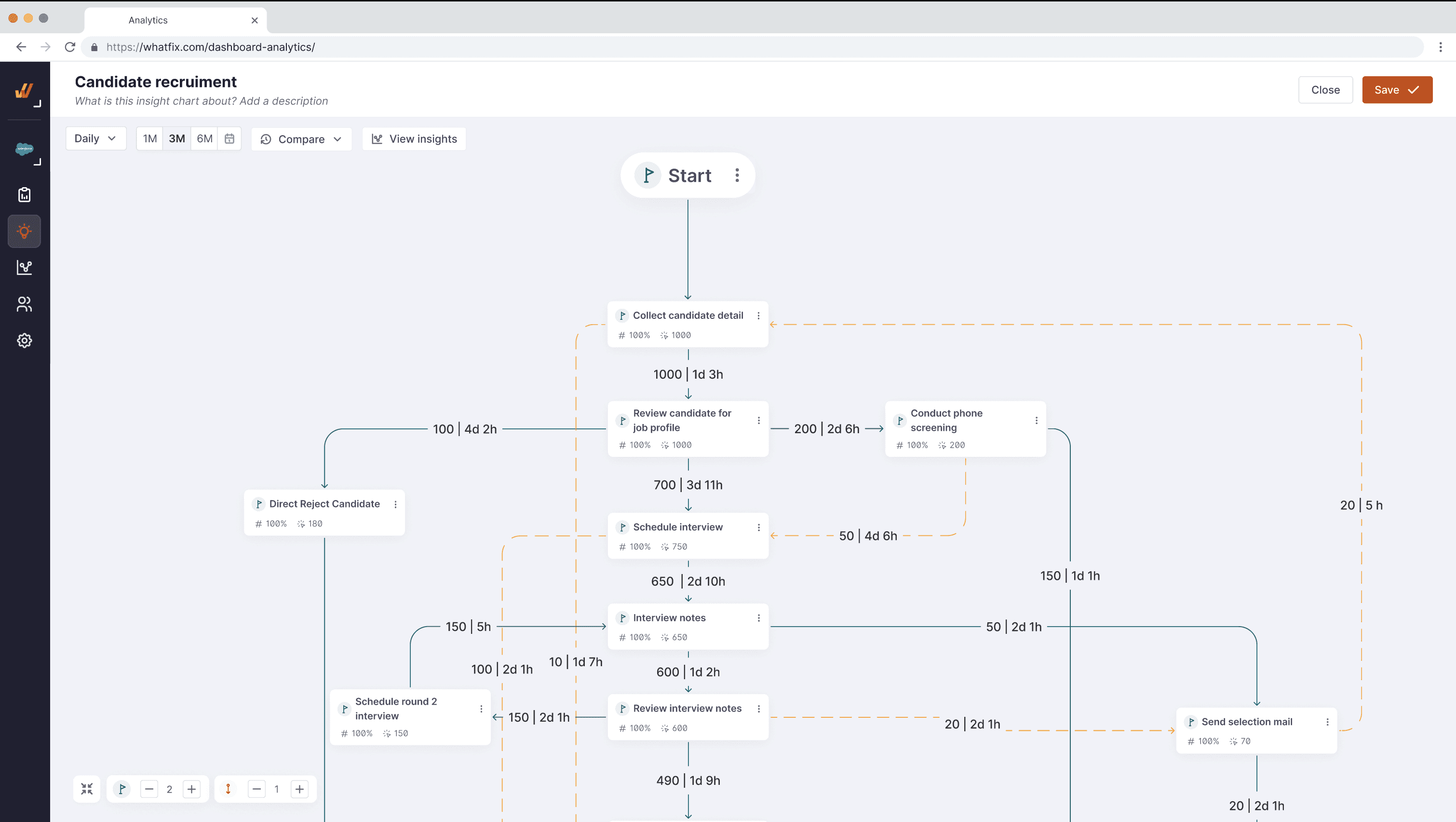
Screen 3: Path deviation interaction — exploring alternate routes users or entities took, with volume and time comparisons.
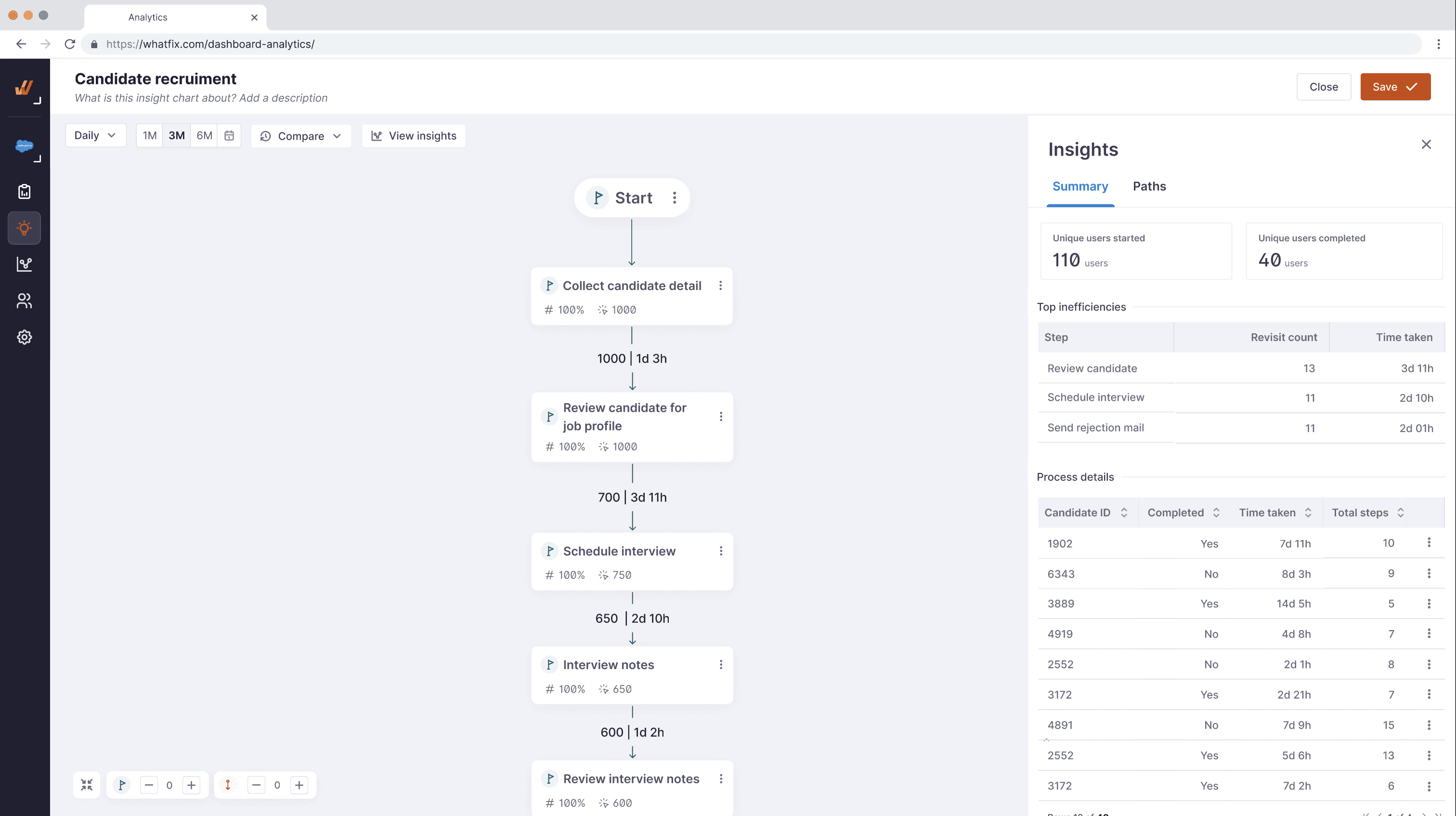
Screen 4: View insights — surfaced bottlenecks, time anomalies, and recommended actions (create cohort / launch DAP)
VALIDATION
07
Testing the concept back with users
The concept was taken back into user testing to validate both the visualisation model and the interaction patterns. The goal was to confirm two things: could users build an accurate process map quickly, and did the insights surface feel actionable rather than informational?
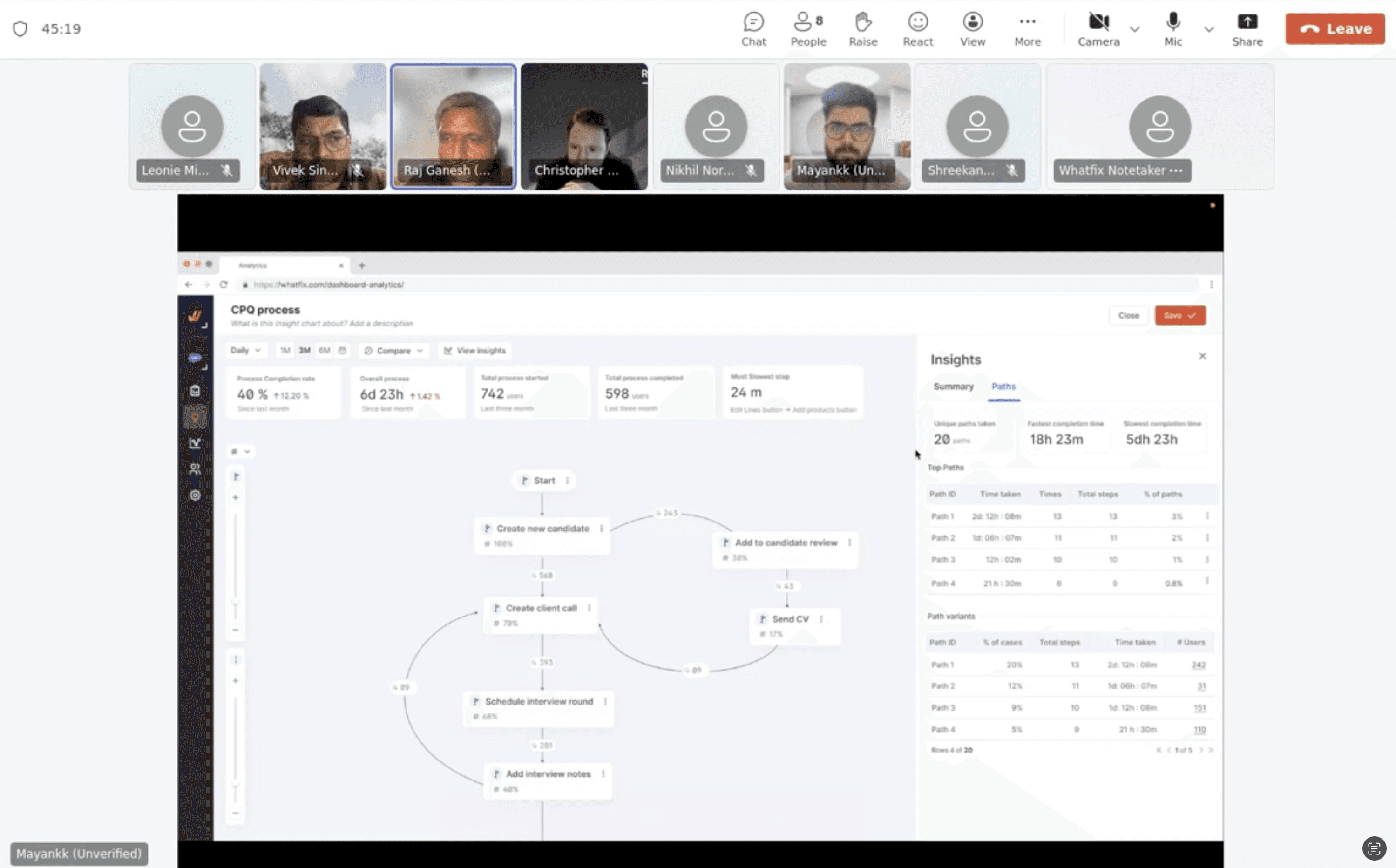
Testing reinforced the core value proposition: users immediately understood the flowchart model, and the ability to directly launch DAP content from a bottleneck node was consistently cited as the most differentiated capability. The combination of insight and action in one workflow was something no tool in their current stack could offer.
The moment a user could click on the slowest step and immediately deploy a tooltip guide was when everything clicked for them.
Testing also validated the prioritisation of KPIs. Completion rate, average time, and bottleneck identification resonated universally — no user asked for additional metrics before these were present. This gave us clear scope for v1.
OUTCOME
08
Shipped, scoped, and ready to grow
Research and validation confirmed the need — and also clarified the right scope for version 1. Non-linear processes, while real and important, introduced significant complexity in both the mapping experience and the underlying data model. The decision was made to scope v1 to linear processes, which covered the majority of immediate customer needs and could be shipped faster.
Process Insights v1 shipped as Process Funnel — live in the product, with user-defined linear process tracking, per-stage metrics, and the ability to launch DAP content from bottleneck stages.
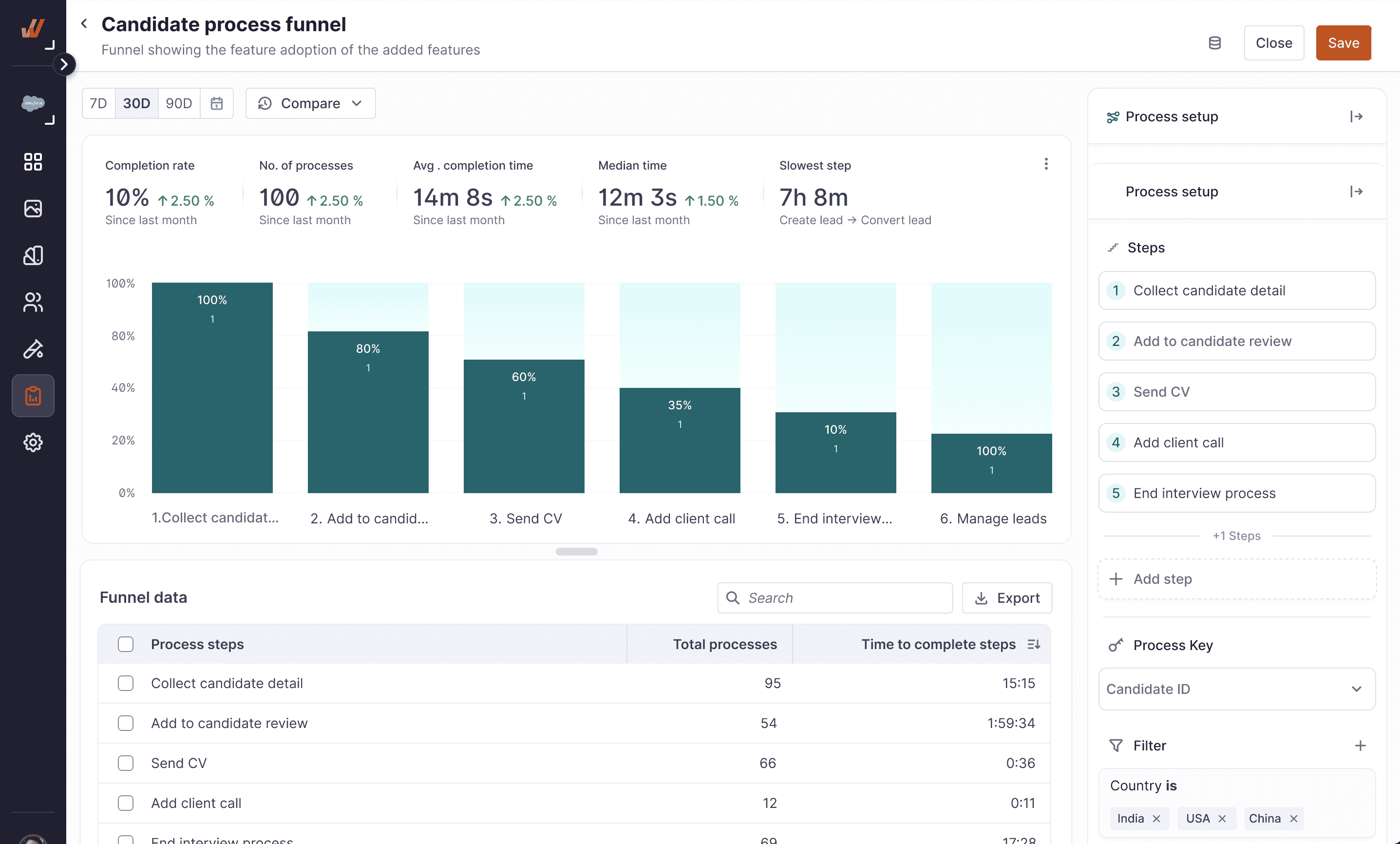
The non-linear process model — the flowchart-based vision — remains the north star for future iterations. The research, the competitive positioning insight, and the customer validation all still hold. We just built the foundation first.
✔️
Hypothesis validated across 7 users in 5 industries before a single line of production code was written.
✔️
Differentiated positioning confirmed: only platform combining process analytics with in-context DAP actions.
✔️
v1 scoped intelligently — linear processes shipped; non-linear architecture preserved for future expansion.
✔️
Feature live in product as Process Funnel, addressing the core unmet need with a clear upgrade path
REFLECTION
09
What I'd do differently
Starting with a literature review in a space I didn't know was the right call — it gave me the vocabulary to have credible conversations in user research instead of relying on participants to educate me from scratch. I'd do that again without hesitation.
What I'd push harder on next time is earlier involvement of the data team to stress-test the entity-tracking model. Some of the non-linear process ideas that got descoped weren't just a design scope decision — they surfaced data architecture constraints late in the process. Surfacing those earlier would have produced sharper scoping conversations sooner.
The pattern of customers hacking together multiple funnel charts as a workaround was one of the most useful signals in the entire project. I'd make dashboard audits a standard part of discovery now — customers tell you what they need not just in interviews, but in the workarounds they've already built.