Dashboard 2.0
OCT’25-DEC’25
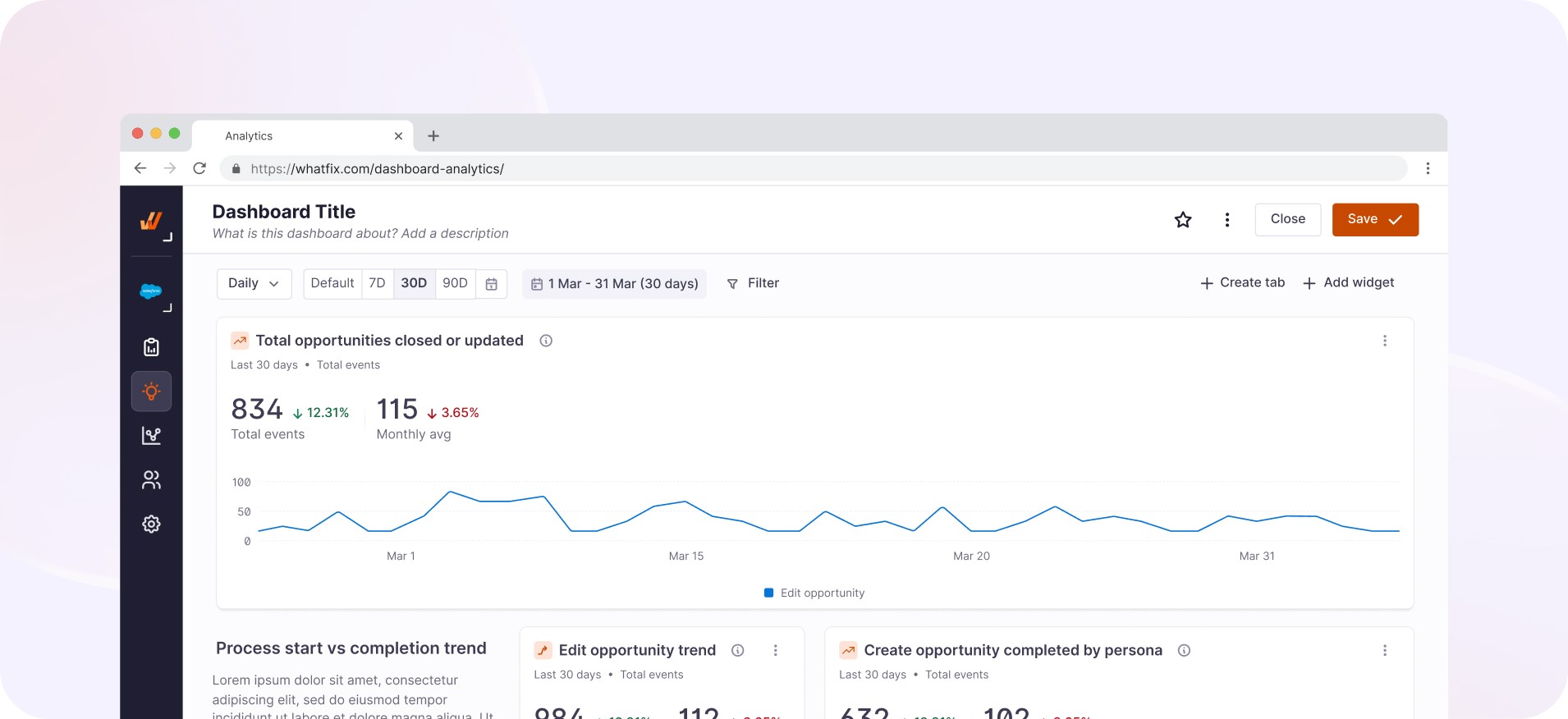
Led the initiative to influence redesigning of the existing dashboard and drive the project end to end. Created new charting library and several new components such as text description, chart widgets etc.
Overview
Whatfix Product Analytics empowers application owners and product managers with a no-code event-tracking solution to analyze user behavior on internal software and customer-facing apps
One important way of presenting data and reports is by creating and sharing dashboards. Dashboards help you visualize your data and help with reporting. Add contextual Trend Insights, Funnel Insights, User Journeys, or Ask Whatfix AI-generated insights to your Dashboards. Create and customize Dashboards based on your business needs and use cases, and export them
Problem space
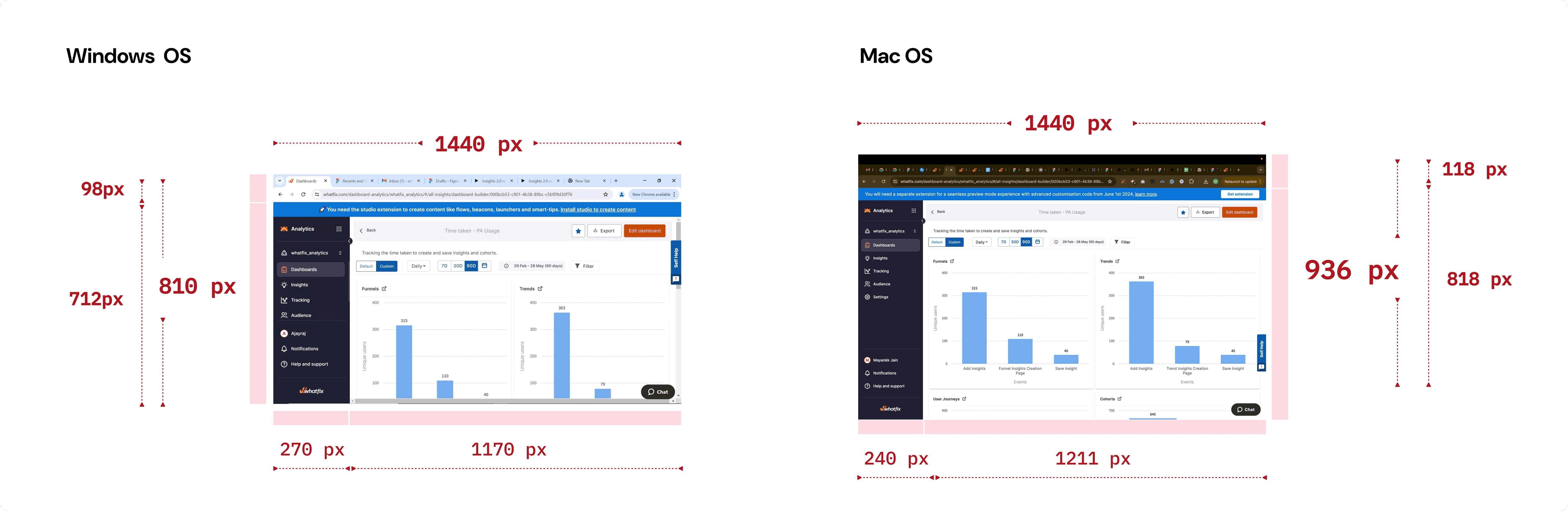
Our current dashboard had components that rendered too large for desktop users, especially Windows users. Users could barely view one widget at a time on the dashboard. Many users reported usability issues with how data was displayed across the dashboard and its widgets.
Additionally, many users without analytics expertise struggled to understand dashboard content and chart narratives. They found it challenging to convert data insights into concrete actions, which limited their ability to achieve desired outcomes.
Problem space
Our current dashboard had components that rendered too large for desktop users, especially Windows users. Users could barely view one widget at a time on the dashboard. Many users reported usability issues with how data was displayed across the dashboard and its widgets.
Additionally, many users without analytics expertise struggled to understand dashboard content and chart narratives. They found it challenging to convert data insights into concrete actions, which limited their ability to achieve desired outcomes.
Dashboard 2.0
OCT’25-DEC’25
Led the initiative to influence redesigning of the existing dashboard and drive the project end to end. Created new charting library and several new components such as text description, chart widgets etc.
Overview
Whatfix Product Analytics empowers application owners and product managers with a no-code event-tracking solution to analyze user behavior on internal software and customer-facing apps
One important way of presenting data and reports is by creating and sharing dashboards. Dashboards help you visualize your data and help with reporting. Add contextual Trend Insights, Funnel Insights, User Journeys, or Ask Whatfix AI-generated insights to your Dashboards. Create and customize Dashboards based on your business needs and use cases, and export them
Problem space
Our current dashboard had components that rendered too large for desktop users, especially Windows users. Users could barely view one widget at a time on the dashboard. Many users reported usability issues with how data was displayed across the dashboard and its widgets.
Additionally, many users without analytics expertise struggled to understand dashboard content and chart narratives. They found it challenging to convert data insights into concrete actions, which limited their ability to achieve desired outcomes.
Problem space
Our current dashboard had components that rendered too large for desktop users, especially Windows users. Users could barely view one widget at a time on the dashboard. Many users reported usability issues with how data was displayed across the dashboard and its widgets.
Additionally, many users without analytics expertise struggled to understand dashboard content and chart narratives. They found it challenging to convert data insights into concrete actions, which limited their ability to achieve desired outcomes.
How did we uncover the actual problems to solve?
How did we uncover the actual problems to solve?
We conducted user interviews with customers who had provided feedback, as well as users selected based on their usage patterns.
Despite having rich data, users struggled to:
Quickly identify actionable insights
Use dashboards effectively on smaller screens
Scan and compare metrics across widgets
This resulted in:
Low engagement with analytics dashboards
Over-reliance on exports and manual analysis
Poor adoption among non-analytics-savvy users
We conducted user interviews with customers who had provided feedback, as well as users selected based on their usage patterns.
Despite having rich data, users struggled to:
Quickly identify actionable insights
Use dashboards effectively on smaller screens
Scan and compare metrics across widgets
This resulted in:
Low engagement with analytics dashboards
Over-reliance on exports and manual analysis
Poor adoption among non-analytics-savvy users
Constraints & Complexity
Constraints & Complexity
Dashboards were used across multiple personas with varying data literacy
Widgets had grown organically with no clear layout system
Needed to support responsive behavior without breaking existing dashboards
Engineering bandwidth was limited—solutions had to be incremental and scalable
High internal visibility and pressure to show impact quickly
Dashboards were used across multiple personas with varying data literacy
Widgets had grown organically with no clear layout system
Needed to support responsive behavior without breaking existing dashboards
Engineering bandwidth was limited—solutions had to be incremental and scalable
High internal visibility and pressure to show impact quickly
How did I go about solving it?
How did I go about solving it?
I led a system-level redesign rather than a cosmetic refresh.
I led a system-level redesign rather than a cosmetic refresh.
PART 1
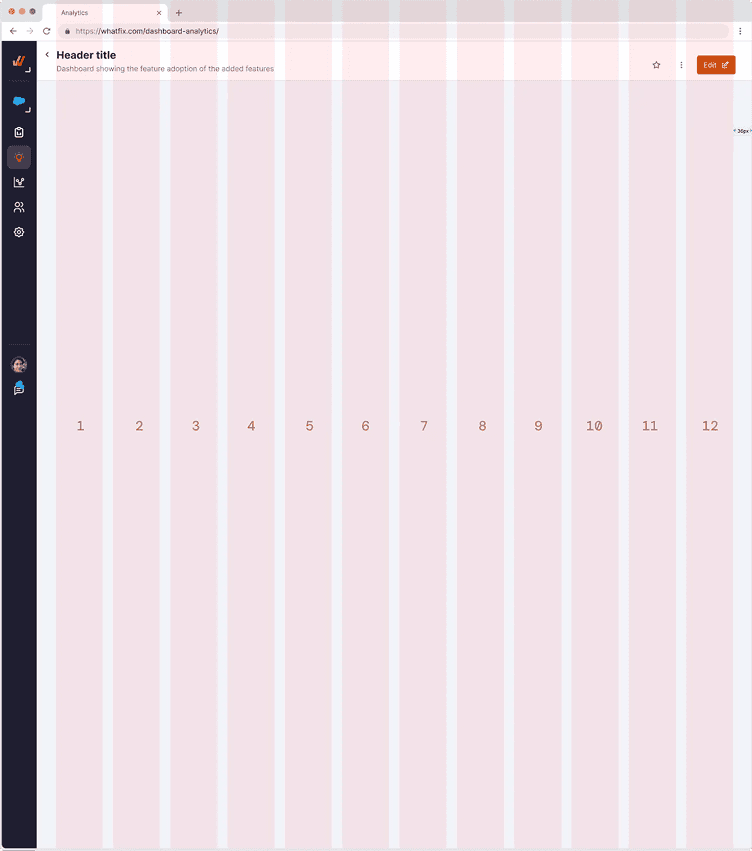
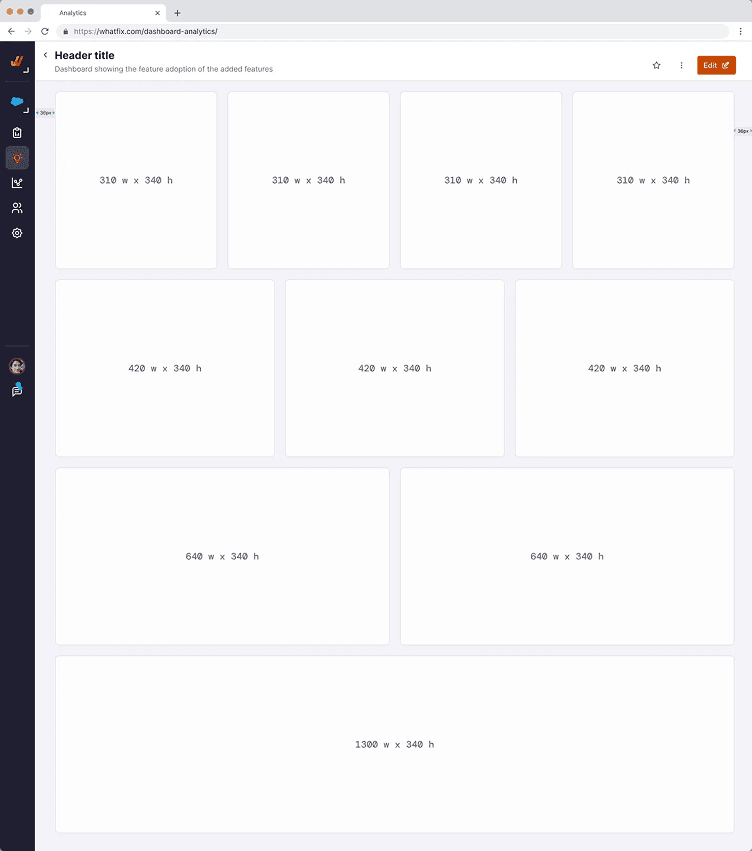
Defined a scalable dashboard layout framework
Introduced a grid-based system with defined min/max widget width
Enabled fluid resizing while maintaining legibility
Ensured consistency across devices without forcing fixed layouts
Introduced a grid-based system with defined min/max widget width
Enabled fluid resizing while maintaining legibility
Ensured consistency across devices without forcing fixed layouts
PART 2
Chart Widget Redesign
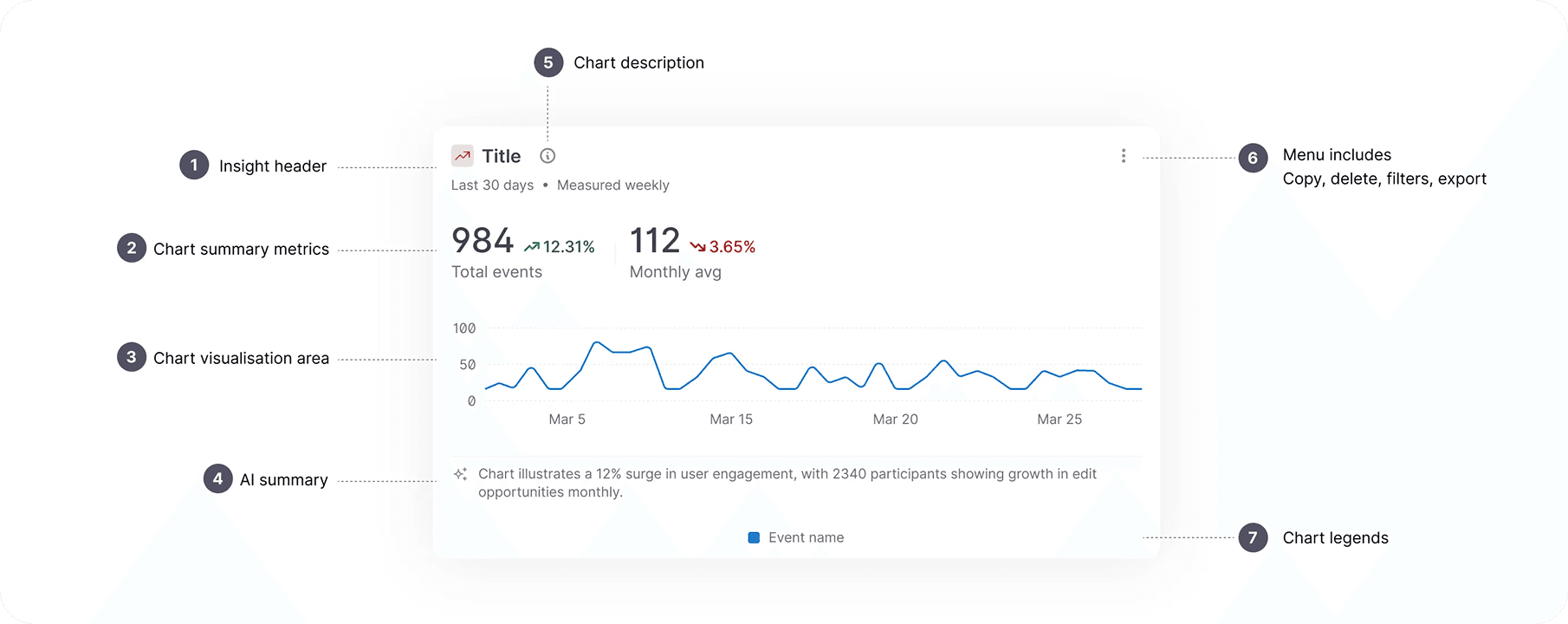
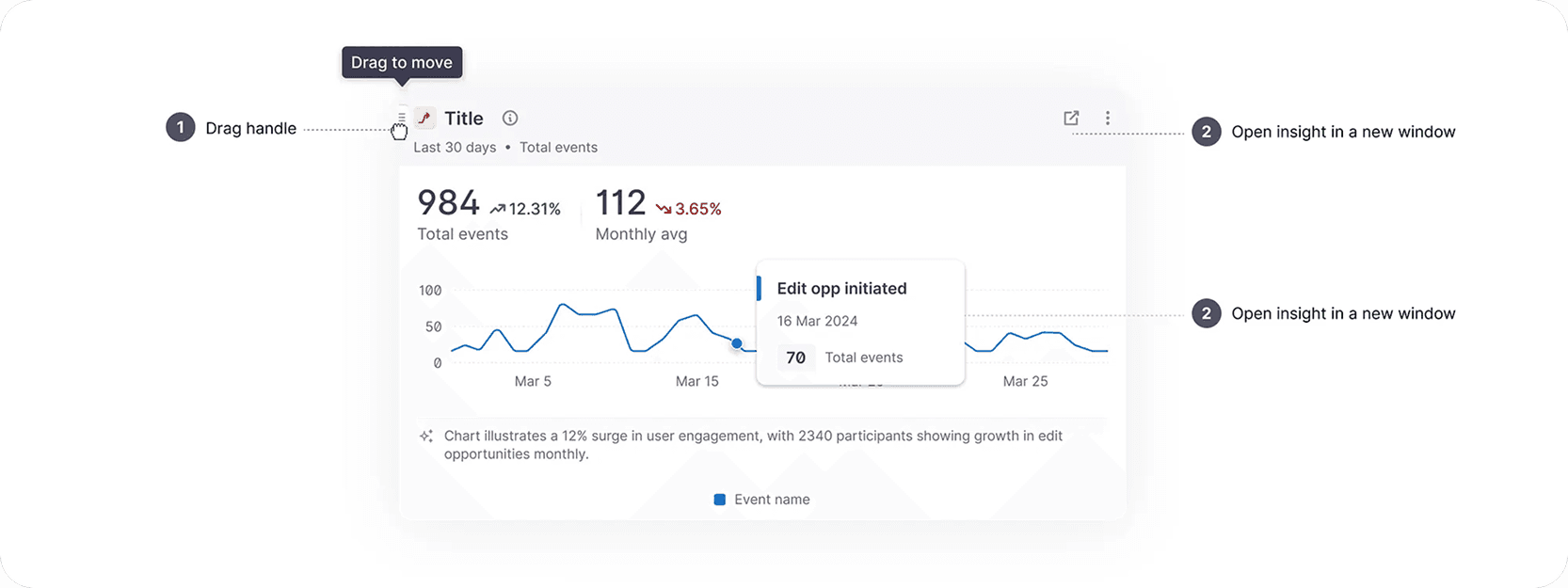
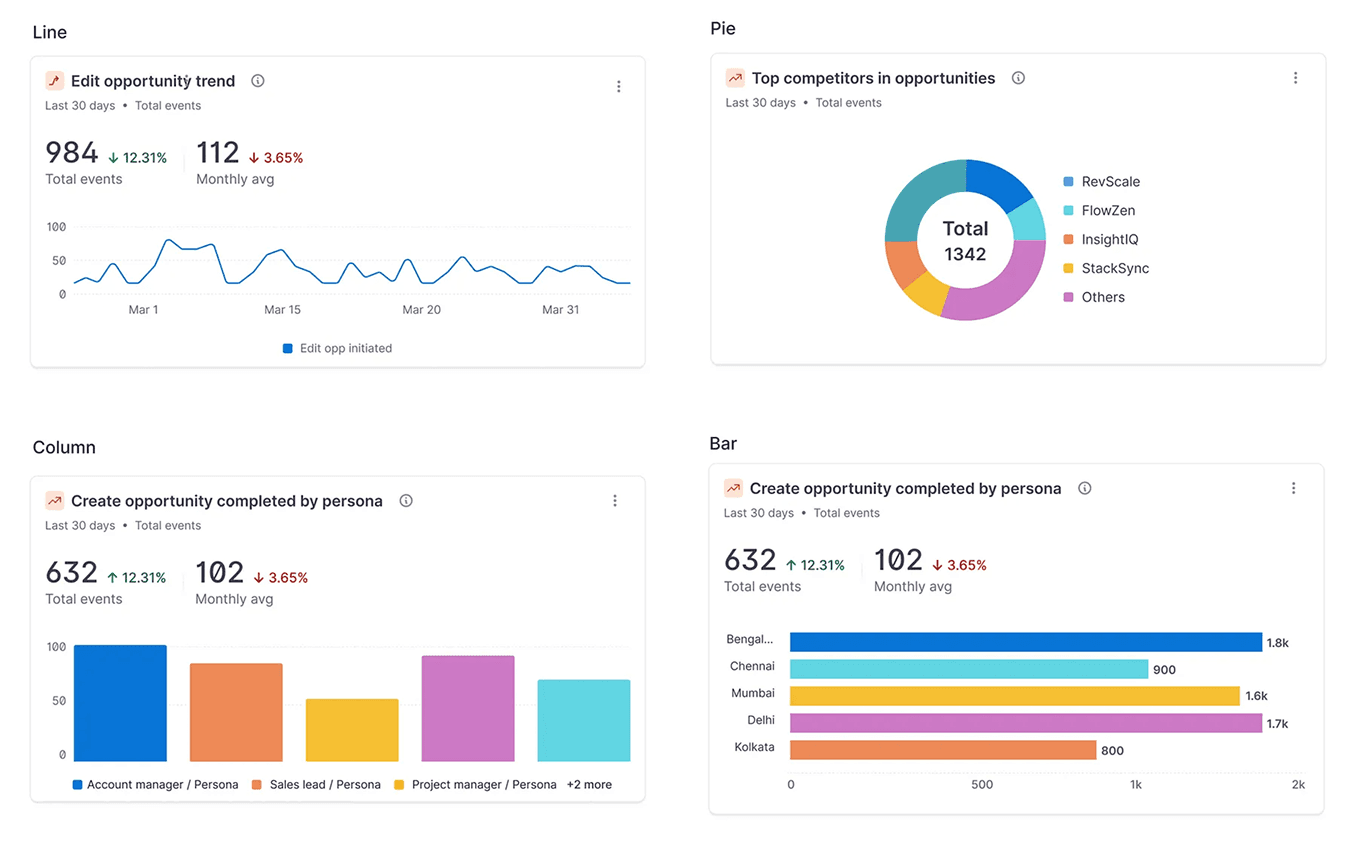
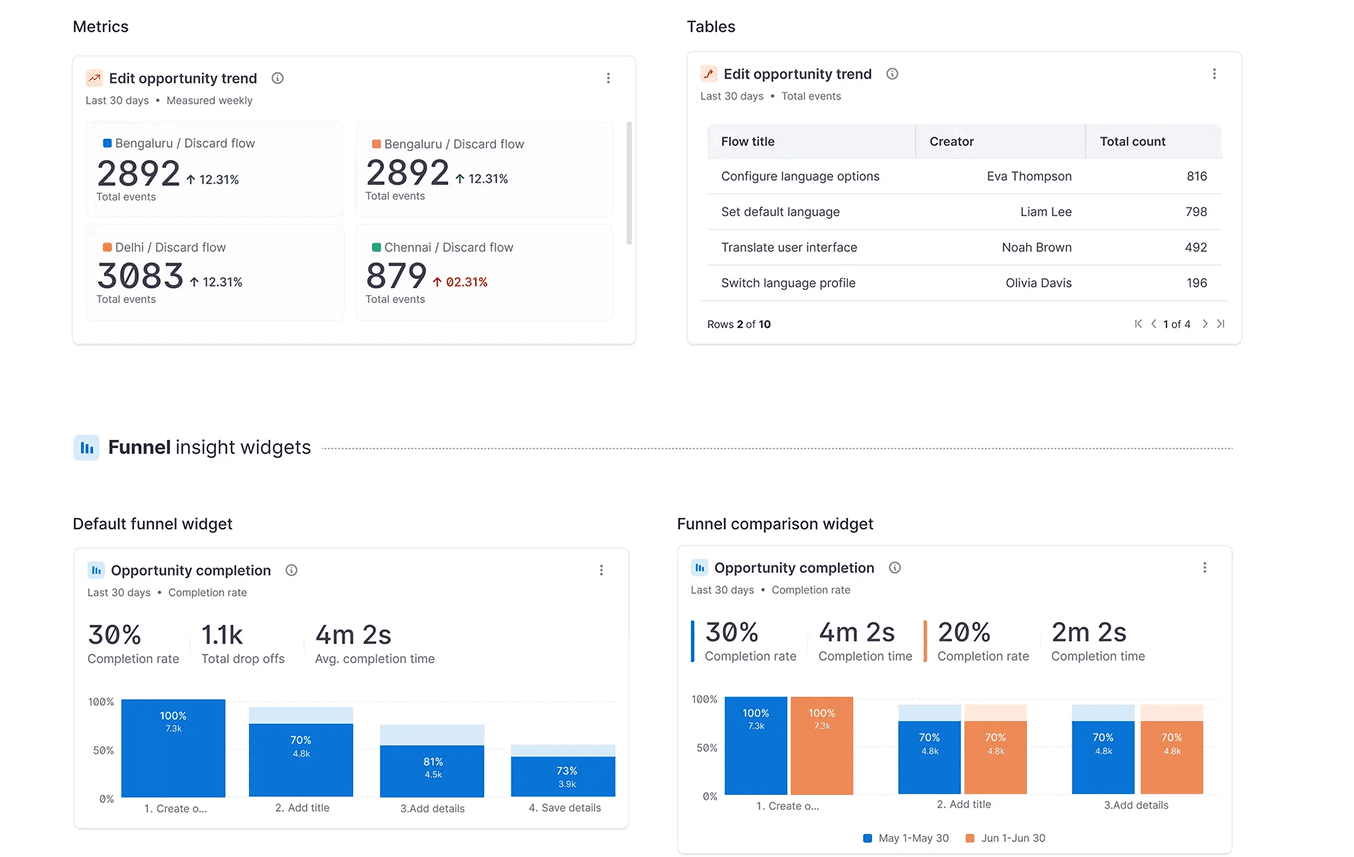
Chart widgets are crucial dashboard components. To ensure a responsive dashboard, we redesigned charts to be responsive and adaptive, maintaining legibility across all screen sizes. Key improvements include:
Integrated Metrics: Metrics are now directly incorporated within the chart for immediate user insights.
AI-Powered Summaries: AI-generated summaries provide quick overviews of chart data.
Data-Focused Presentation: Redundant information (e.g., all date ranges, Y-axis metrics) has been removed to emphasize the core data.
Enhanced Hover Interaction: The hover state is now more informative, featuring a "snapping" behavior for easy data point navigation and detailed information retrieval.
Comprehensive Design: Each card was designed to accommodate 20+ use cases, including hover, drag, and other interactive states.
Chart widgets are crucial dashboard components. To ensure a responsive dashboard, we redesigned charts to be responsive and adaptive, maintaining legibility across all screen sizes. Key improvements include:
Integrated Metrics: Metrics are now directly incorporated within the chart for immediate user insights.
AI-Powered Summaries: AI-generated summaries provide quick overviews of chart data.
Data-Focused Presentation: Redundant information (e.g., all date ranges, Y-axis metrics) has been removed to emphasize the core data.
Enhanced Hover Interaction: The hover state is now more informative, featuring a "snapping" behavior for easy data point navigation and detailed information retrieval.
Comprehensive Design: Each card was designed to accommodate 20+ use cases, including hover, drag, and other interactive states.
PART 3
Widget Interaction and Customisation
In edit mode, users can now interact with widgets in the following ways:
Resizing: Widgets can be resized both horizontally and vertically.
Drag and Drop: Widgets can be dragged and dropped within the dashboard. The system automatically adjusts the layout to accommodate repositioned widgets.
Seamless Widget Addition: New widgets can be added directly to the dashboard by hovering between existing widgets, streamlining the creation process.
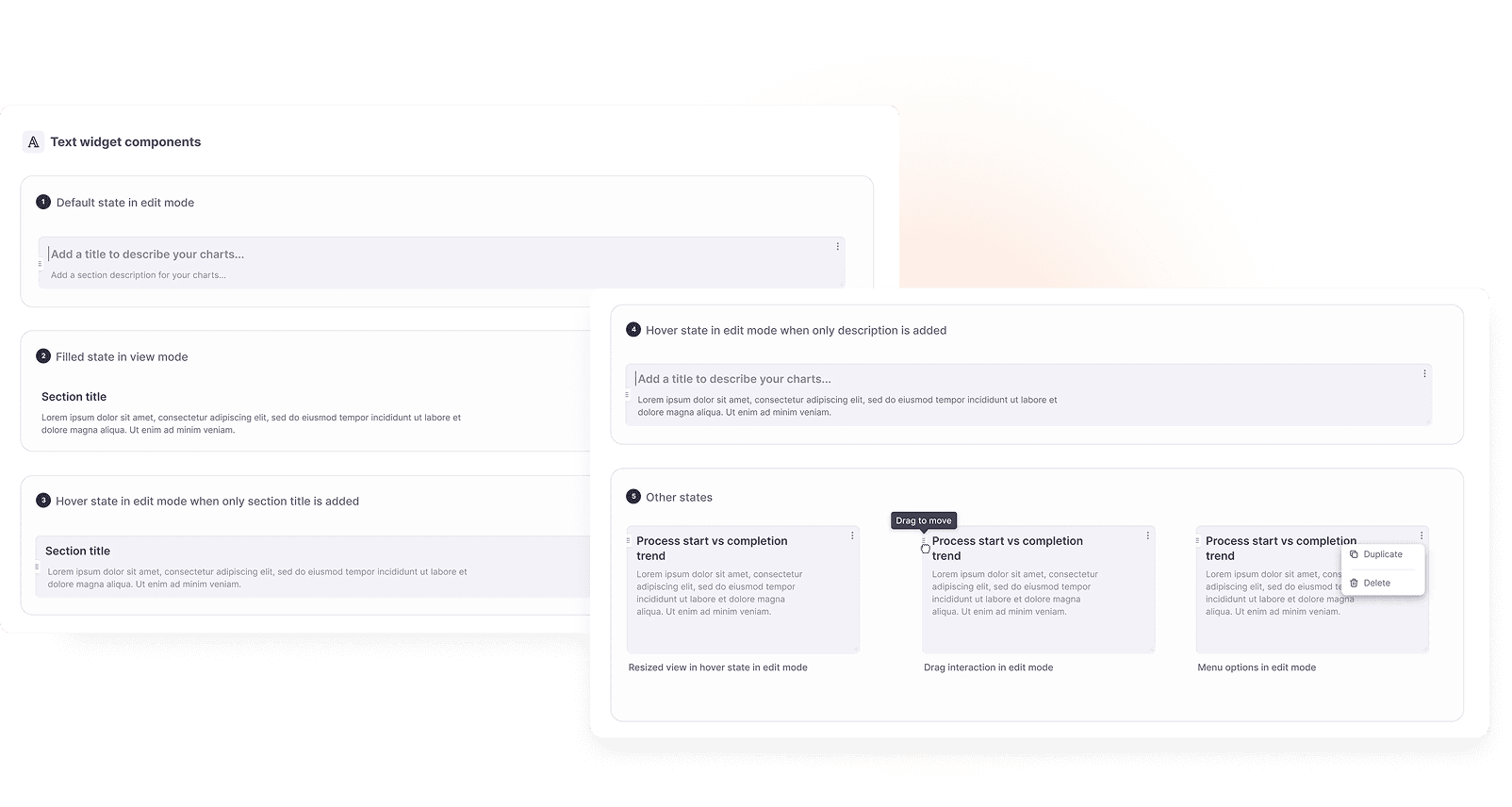
Introduced editable text widget: We added option to add descriptive text for dashboard sections to give the viewer a better context of the insights.
In edit mode, users can now interact with widgets in the following ways:
Resizing: Widgets can be resized both horizontally and vertically.
Drag and Drop: Widgets can be dragged and dropped within the dashboard. The system automatically adjusts the layout to accommodate repositioned widgets.
Seamless Widget Addition: New widgets can be added directly to the dashboard by hovering between existing widgets, streamlining the creation process.
Introduced editable text widget: We added option to add descriptive text for dashboard sections to give the viewer a better context of the insights.
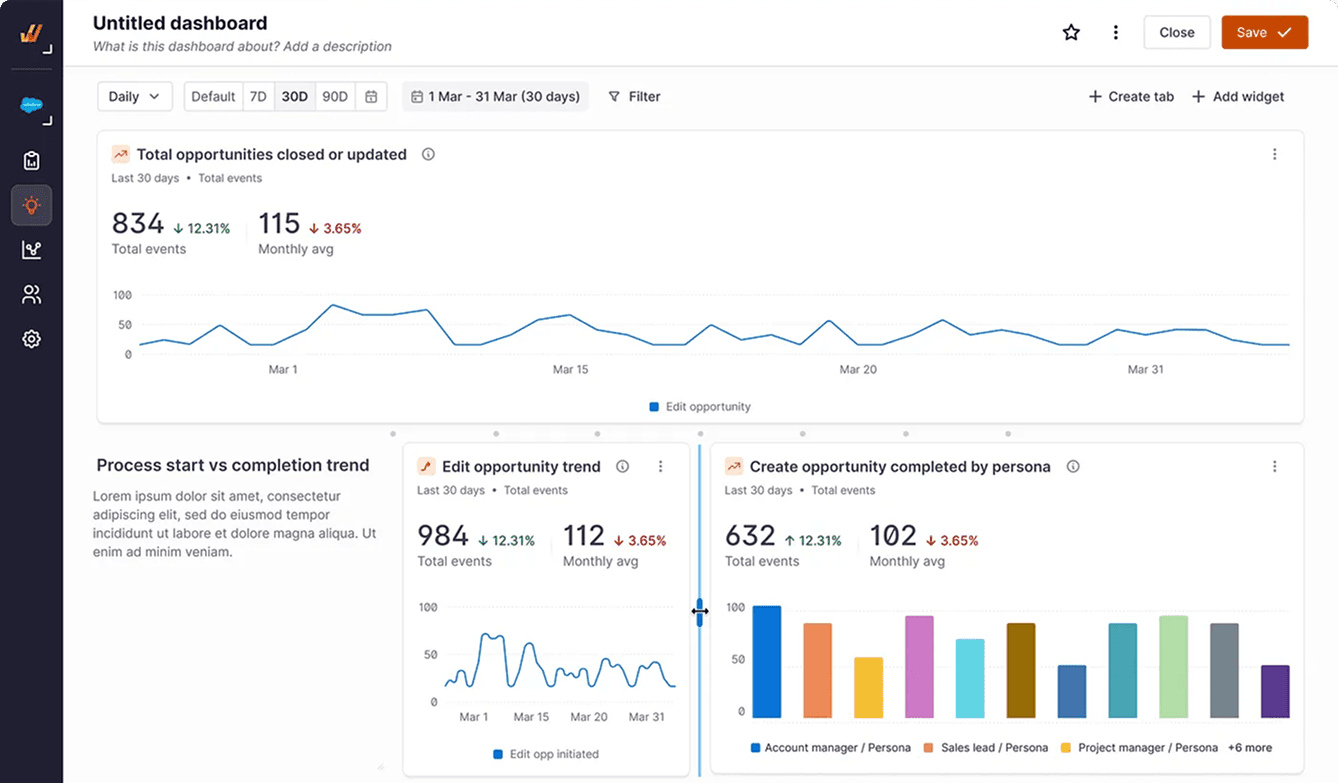
Resizing widgets
Widgets can be resized both horizontally and vertically.
Widgets can be resized both horizontally and vertically.
Drag and Drop
Widgets can be dragged and dropped within the dashboard. The system automatically adjusts the layout to accommodate repositioned widgets.

Seamless Widget Addition
New widgets can be added directly to the dashboard by hovering between existing widgets, streamlining the creation process.
New widgets can be added directly to the dashboard by hovering between existing widgets, streamlining the creation process.

Editable text widget
We added option to add descriptive text for dashboard sections to give the viewer a better context of the insights.
We added option to add descriptive text for dashboard sections to give the viewer a better context of the insights.
The Final View
The Final View
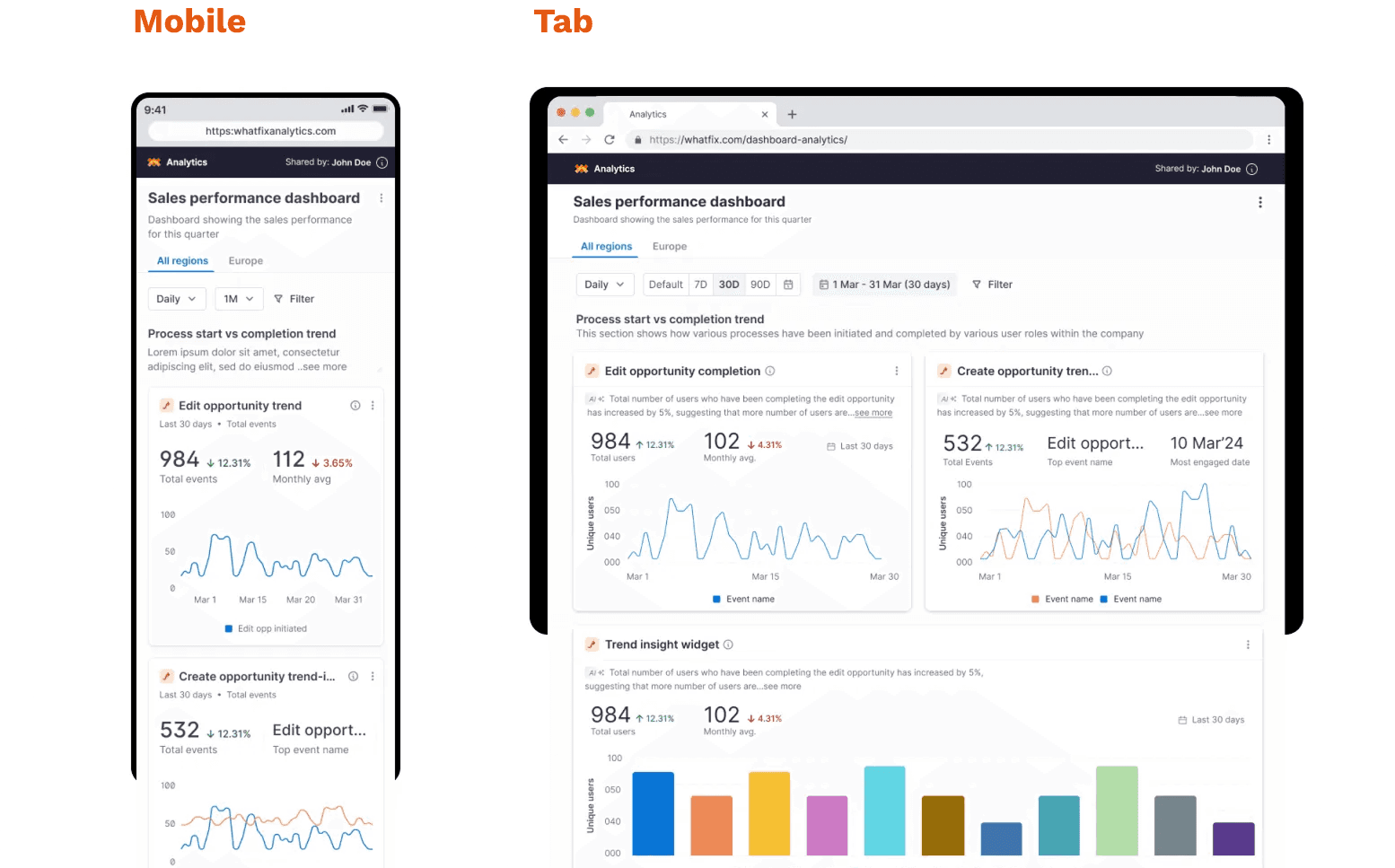
Designed for across multiple devices
Designed for across multiple devices
Each component that we created was made sure was responsive and accessible across devices and designer for Desktop, Tab and mobile.
Each component that we created was made sure was responsive and accessible across devices and designer for Desktop, Tab and mobile.
Desktop View

Outcome & Impact
Outcome & Impact
Improved dashboard usability across all screen sizes
Increased confidence among non-analytics users in interpreting data
Reduced friction in dashboard scanning and insight discovery
Strengthened internal alignment on dashboards as a decision-making tool, not just a reporting surface
While exact metrics varied by customer, qualitative feedback consistently highlighted:
Faster insight discovery
Better readability
More intentional dashboard creation
Improved dashboard usability across all screen sizes
Increased confidence among non-analytics users in interpreting data
Reduced friction in dashboard scanning and insight discovery
Strengthened internal alignment on dashboards as a decision-making tool, not just a reporting surface
While exact metrics varied by customer, qualitative feedback consistently highlighted:
Faster insight discovery
Better readability
More intentional dashboard creation
Leadership & Collaboration
Leadership & Collaboration
As a Lead Designer, I
Drove alignment with PM and engineering on why this needed to be a system-level change
Helped prioritise the work on the roadmap by tying it to adoption and engagement
Guided engineers through edge cases to ensure design intent survived execution
Advocated for user clarity over feature sprawl
While exact metrics varied by customer, qualitative feedback consistently highlighted:
Faster insight discovery
Better readability
More intentional dashboard creation
As a Lead Designer, I
Drove alignment with PM and engineering on why this needed to be a system-level change
Helped prioritise the work on the roadmap by tying it to adoption and engagement
Guided engineers through edge cases to ensure design intent survived execution
Advocated for user clarity over feature sprawl
While exact metrics varied by customer, qualitative feedback consistently highlighted:
Faster insight discovery
Better readability
More intentional dashboard creation
Key Learnings
Key Learnings
Designing for the User's Environment:
One of the biggest takeaways from this project was the importance of understanding users' environments and interaction touchpoints. Even the most pixel-perfect design can become unusable if it doesn't adapt to real-world conditions. Through research, we uncovered the diversity of devices our users rely on and optimized the UI accordingly to ensure a seamless experience.
Iterate Relentlessly
Iteration was at the heart of our design process. For the chart widgets alone, we explored over 30 design iterations, each aimed at making insights more scannable and accessible. This continuous refinement helped us strip away complexity and create a more intuitive user experience.
Choosing the Right Tools Early
Selecting the right charting library was a critical decision. After multiple proofs of concept (POCs), we ensured the chosen library was flexible enough to align with our design requirements. Making this decision early helped us avoid major roadblocks later - choosing an incompatible library at a later stage could have significantly hindered the project's progress
Designing for the User's Environment:
One of the biggest takeaways from this project was the importance of understanding users' environments and interaction touchpoints. Even the most pixel-perfect design can become unusable if it doesn't adapt to real-world conditions. Through research, we uncovered the diversity of devices our users rely on and optimized the UI accordingly to ensure a seamless experience.
Iterate Relentlessly
Iteration was at the heart of our design process. For the chart widgets alone, we explored over 30 design iterations, each aimed at making insights more scannable and accessible. This continuous refinement helped us strip away complexity and create a more intuitive user experience.
Choosing the Right Tools Early
Selecting the right charting library was a critical decision. After multiple proofs of concept (POCs), we ensured the chosen library was flexible enough to align with our design requirements. Making this decision early helped us avoid major roadblocks later - choosing an incompatible library at a later stage could have significantly hindered the project's progress