OCT’25-DEC’25
OCT’25-DEC’25
How AI evals research shaped a beta conversational analytics AI feature for higher accuracy & adoption?
Redesigned a beta version of the product to a full fledged product driving strategic workshops, interaction design, Evals research, and design system contribution.
Increase in
week 1 retention
Increase in
week 1 retention
Growth in questions
asked per day in 6 months
Growth in questions
asked per day in 6 months
23% → 57%
Shift from manual
to AI workflow
Shift from manual
to AI workflow
Overview
Ask Whatfix AI is an AI-powered analytics feature that converts natural-language questions into data visualizations (Trend, Funnel, User Journey charts) without manual event setup. I led the redesign to transform it from a beta feature with low retention into a trusted analytics partner.
My Role
Led the Strategy and Design for the feature to grow the feature from a beta phase to a full fledged experience.
I took the end-to-end design ownership from understanding the user need & business goal to finally pixel perfecting the product before launch.
For this project I worked closely with :
1 product manager, 1 front end & 2 backend engineer
Problem Space
Ask Whatfix AI's beta release showed poor user retention (15% 7-day retention) despite the promise of natural-language analytics. Users tried the feature once but rarely returned.


Research
Conducted a structured research process combining quantitative usage analytics and qualitative customer interviews, to understand the underlying causes across the user journey
Quantitative Analysis
Current usage patterns and drop-off points
AI accuracy rates across question types
Question categories and phrasing patterns
Quantitative Analysis
Current usage patterns and drop-off points
AI accuracy rates across question types
Question categories and phrasing patterns
Key findings
Through a structured research process combining quantitative usage analytics and qualitative customer interviews, I discovered the real problem wasn't the AI's accuracy—it was a trust and guidance issue across the entire user journey.
Usage Analytics revealed
35% of queries resulted in "no answer" scenarios, users asked only 1.2 questions per session (indicating no follow-through), and 60% abandoned after their first unsuccessful attempt
Customer Interviews uncovered
Users didn't know what questions to ask or how to phrase them, felt uncertain about the AI's reliability, lacked visibility into how their questions were processed, and consistently asked "now what?" after receiving answers
Cross-Functional Synthesis Workshop
Mapped these findings across Pre/During/Post journey stages, revealing that the problem wasn't isolated to any single moment—users needed support throughout their entire analytics journey
Key insights
Pre-Question:
Trust Deficit
Users didn't know what questions to ask. Generic examples felt irrelevant, and early inaccuracies eroded confidence before users could experience value.
During-Question:
Lack of Transparency
No guidance on modes (deep-think vs. normal), no help selecting data, and a blank spinner during processing left users feeling out of control. The AI felt like a black box
Post-Question:
No Clear Next Steps
Users could see data but consistently asked "now what?" The feature provided visibility without actionability, and ineffective feedback mechanisms offered no path forward.
Redefined Problem Statement
" How might we evolve Ask Whatfix AI from a question-answering tool into a trusted decision partner that guides users from intent → insight → action, without requiring analytics expertise? "
Overview
Overview
Ask Whatfix AI is an AI-powered analytics feature that converts natural-language questions into data visualizations (Trend, Funnel, User Journey charts) without manual event setup. I led the redesign to transform it from a beta feature with low retention into a trusted analytics partner.
Ask Whatfix AI is an AI-powered analytics feature that converts natural-language questions into data visualizations (Trend, Funnel, User Journey charts) without manual event setup. I led the redesign to transform it from a beta feature with low retention into a trusted analytics partner.
Ask Whatfix AI is an AI-powered analytics feature that converts natural-language questions into data visualizations (Trend, Funnel, User Journey charts) without manual event setup. I led the redesign to transform it from a beta feature with low retention into a trusted analytics partner.
My Role
Led the Strategy and Design for the feature to grow the feature from a beta phase to a full fledged experience.
I took the end-to-end design ownership from understanding the user need & business goal to finally pixel perfecting the product before launch.
For this project I worked closely with :
1 product manager, 1 front end & 2 backend engineer
My Role
Led the Strategy and Design for the feature to grow the feature from a beta phase to a full fledged experience.
Led the Strategy and Design for the feature to grow the feature from a beta phase to a full fledged experience.
I took the end-to-end design ownership from understanding the user need & business goal to finally pixel perfecting the product before launch.
I took the end-to-end design ownership from understanding the user need & business goal to finally pixel perfecting the product before launch.
For this project I worked closely with :
1 product manager, 1 front end & 2 backend engineer
For this project I worked closely with :
1 product manager, 1 front end & 2 backend engineer
Key insights
Key insights
Through a structured research process combining quantitative usage analytics and qualitative customer interviews, I discovered the real problem wasn't the AI's accuracy—it was a trust and guidance issue across the entire user journey.
We realized the core issue wasn’t just AI accuracy, but gaps across the entire user journey spanning the pre-question, in-question, and post-question phases.
Through a structured research process combining quantitative usage analytics and qualitative customer interviews, I discovered the real problem wasn't the AI's accuracy—it was a trust and guidance issue across the entire user journey.
Pre-Question:
Trust Deficit
Pre-Question
Blank slate paralysis
Pre-Question:
Blank slate paralysis
Users didn't know what questions to ask. Generic examples felt irrelevant, and early inaccuracies eroded confidence before users could experience value.
During-Question:
Lack of Transparency
During-Question:
Lack of Transparency
No guidance on modes (deep-think vs. normal), no help selecting data, and a blank spinner during processing left users feeling out of control. The AI felt like a black box
Lack of guidance on modes, data selection, and a blank loading state left users feeling out of control. When queries weren’t understood, the AI took too long and often returned no results making it feel like a black box.
Post-Question:
No Clear Next Steps
Post-Question
No Clear Next Steps
Post-Question:
No Clear Next Steps
Users could see data but consistently asked "now what?" The feature provided visibility without actionability, and ineffective feedback mechanisms offered no path forward.
Analytics Revealed
High number of unanswered questions
35% of queries resulted in "no answer" scenarios, users asked only 1.2 questions per session (indicating no follow-through), and 60% abandoned after their first unsuccessful attempt
Research
Research
Conducted a structured research process combining quantitative usage analytics and qualitative customer interviews, to understand the underlying causes across the user journey
Conducted a structured research process combining quantitative usage analytics and qualitative customer interviews, to understand the underlying causes across the user journey
Quantitative Analysis
Quantitative Analysis
Quantitative Analysis
Current usage patterns and drop-off points
AI accuracy rates across question types
Question categories and phrasing patterns
Current usage patterns and friction points
AI accuracy rates across question types
Question categories and phrasing patterns
Current usage patterns and drop-off points
AI accuracy rates across question types
Question categories and phrasing patterns
Quantitative Analysis
Conducted customer interviews to understand:
How customers use Ask Insights I in their workflows
Where the experience falls short
Value derived vs. expected
Qualitative Analysis
Conducted customer interviews to understand:
How customers use Ask Insights I in their workflows
Where the experience falls short
Value derived vs. expected
Problem Space
Problem Space
Ask Whatfix AI's beta release showed poor user retention (15% 7-day retention) despite the promise of natural-language analytics. Users tried the feature once but rarely returned.
Ask Whatfix AI's beta release showed poor user retention (15% 7-day retention) despite the promise of natural-language analytics. Users tried the feature once but rarely returned.
Ask Whatfix AI's beta release showed poor user retention (15% 7-day retention) despite the promise of natural-language analytics. Users tried the feature once but rarely returned.
Existing UI
Redfined Problem Statement
Redfined Problem Statement
" How might we evolve Ask Whatfix AI from a question-answering tool into a trusted decision partner that guides users from intent → insight → action, without requiring analytics expertise? "
" How might we evolve Ask Whatfix AI from a question-answering tool into a trusted decision partner that guides users from intent → insight → action, without requiring analytics expertise? "
" How might we evolve Ask Whatfix AI from a question-answering tool into a trusted decision partner that guides users from intent → insight → action, without requiring analytics expertise? "
Pre-Question Phase
Pre-Question Phase
To solve for blank slate paralysis and understanding of “what can this do for me?”
To solve for blank slate paralysis and understanding of “what can this do for me?”
Analytics capability education
Right upon landing, the tool highlights essential analytical powers such as creating new insights, performing breakdowns, and building cohorts immediately.
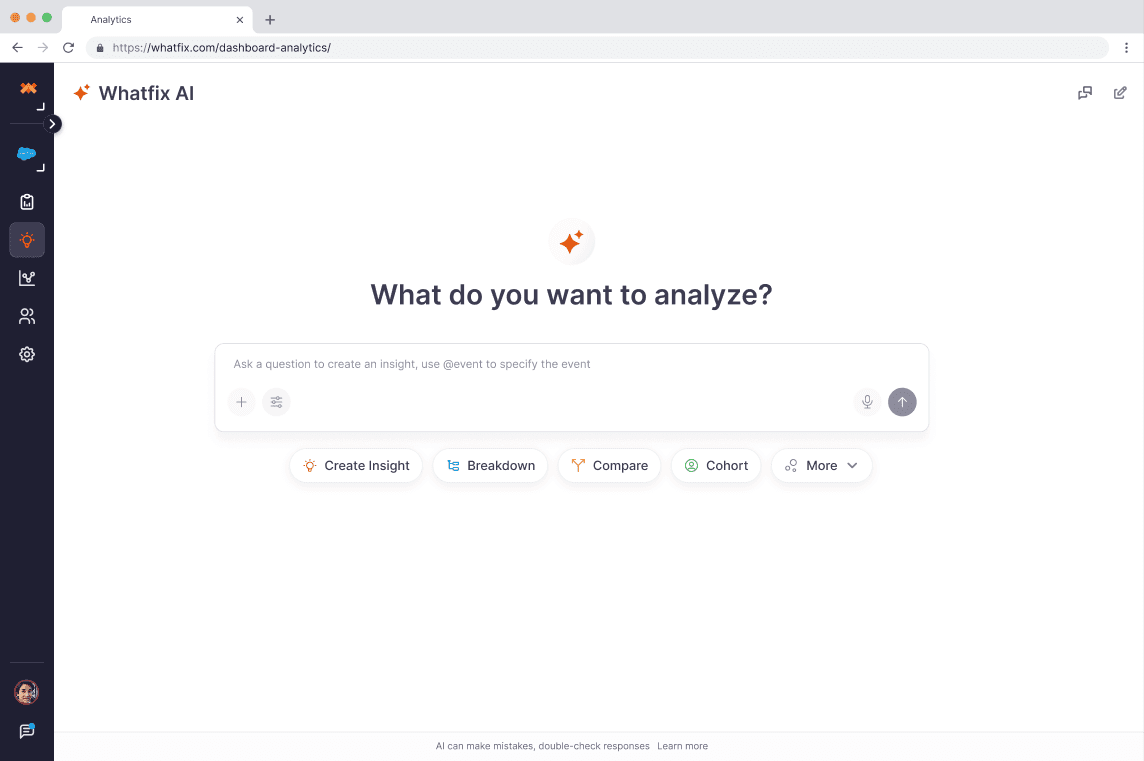

Analytics capability education
Right upon landing, the tool highlights essential analytical powers such as creating new insights, performing breakdowns, and building cohorts immediately.
Prompt Library
Access a curated collection of ready-to-use questions that cover a wide range of analytics scenarios, saving you from having to draft queries from scratch
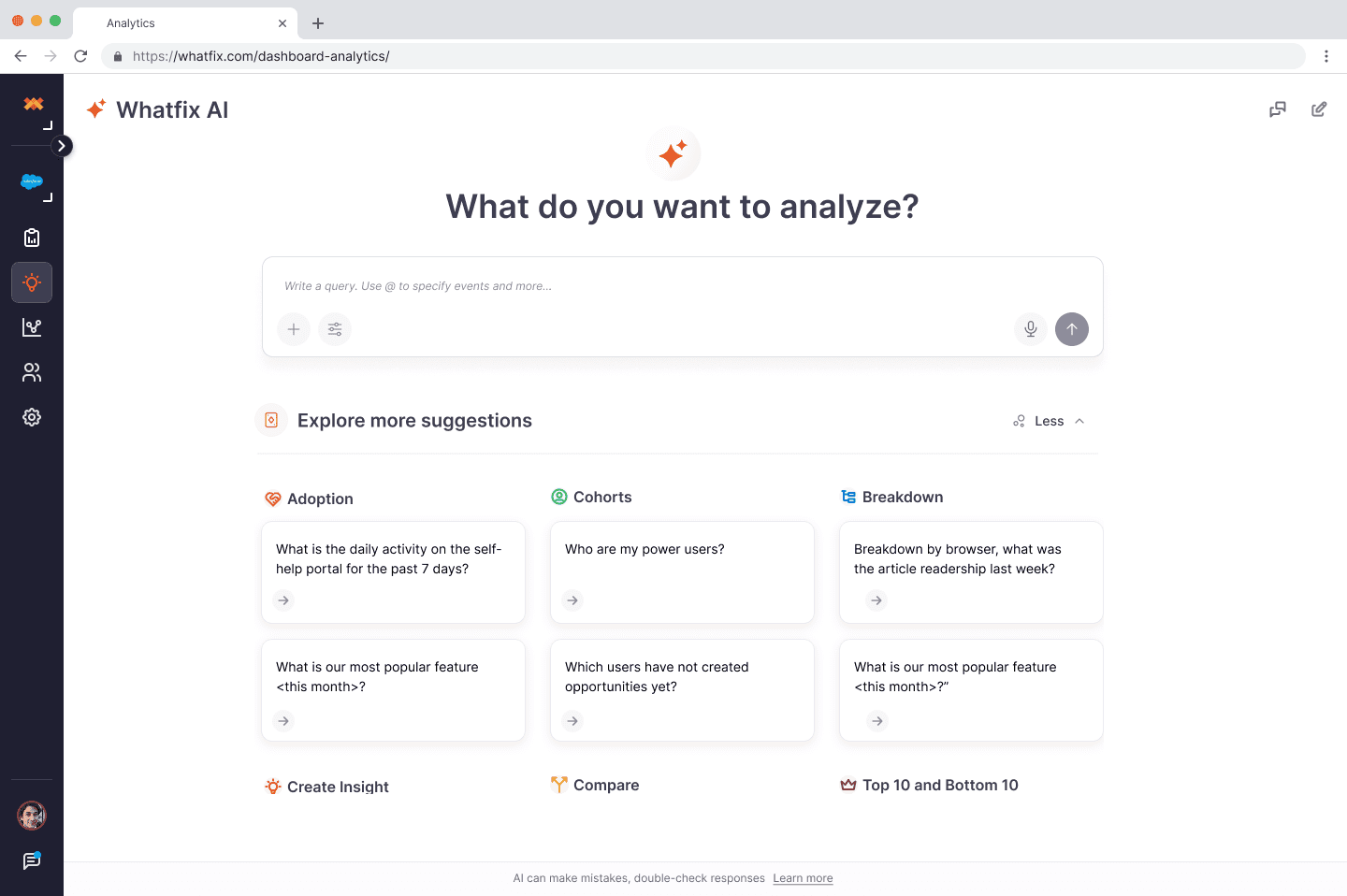
Prompt Library
Access a curated collection of ready-to-use questions that cover a wide range of analytics scenarios, saving you from having to draft queries from scratch
Question Phase
Question Phase
To solve for lack of context for LLM and help reduce no response answers
To solve for lack of context for LLM and help reduce no response answers
Mentions
You can tag specific events, pages, existing insights, or dashboards directly in your query. This guides the AI to use those exact sources for generating sharper, more focused answers.
Mentions
You can tag specific events, pages, existing insights, or dashboards directly in your query. This guides the AI to use those exact sources for generating sharper, more focused answers.
Clarifying Question
After delivering an insight, the AI keeps the analysis flowing by suggesting follow-up questions. This allows you to drill deeper, compare data, or explore related trends naturally.
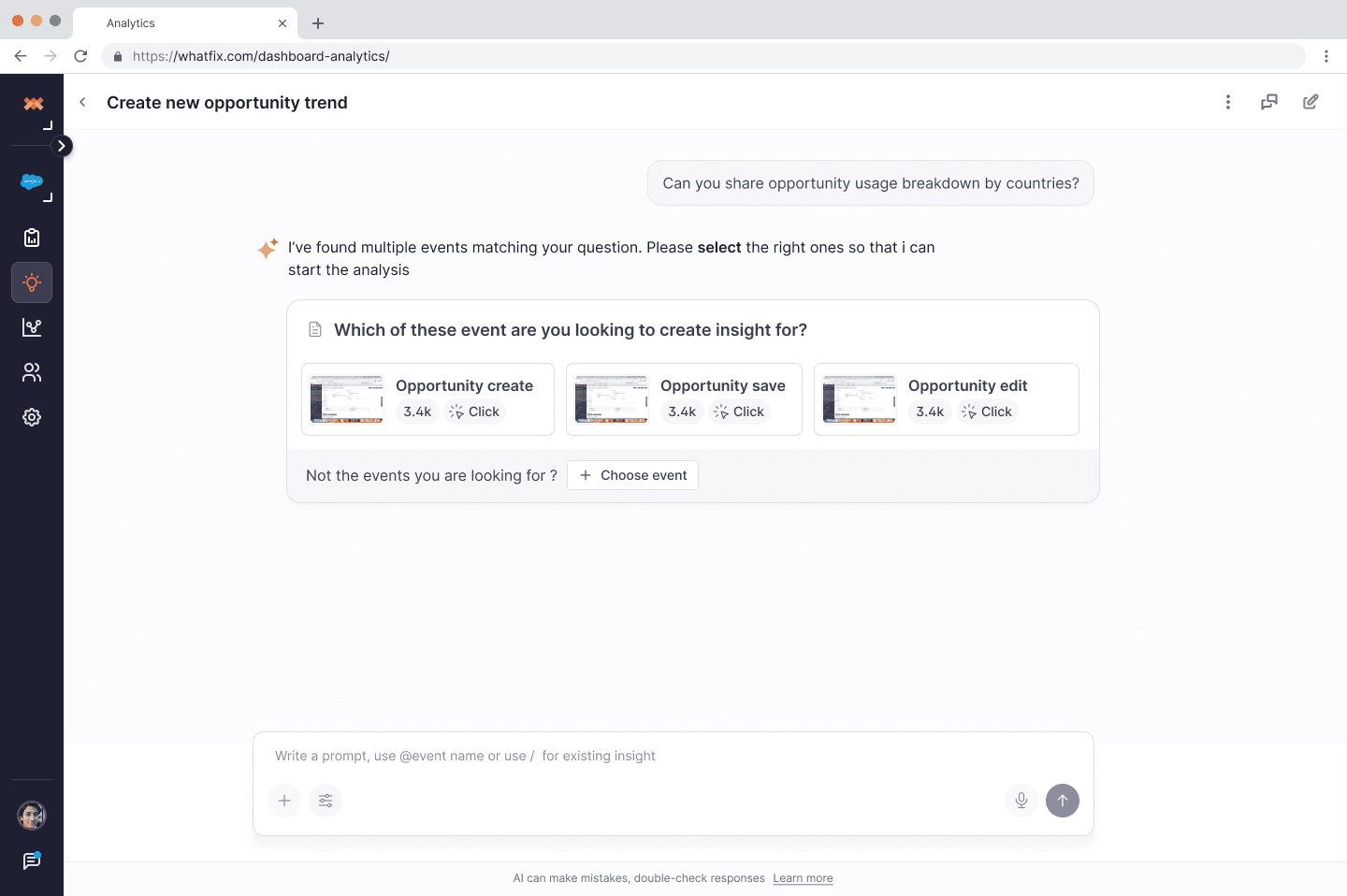
Clarifying Question
After delivering an insight, the AI keeps the analysis flowing by suggesting follow-up questions. This allows you to drill deeper, compare data, or explore related trends naturally.
Conversational Follow-ups
You can tag specific events, pages, existing insights, or dashboards directly in your query. This guides the AI to use those exact sources for generating sharper, more focused answers.
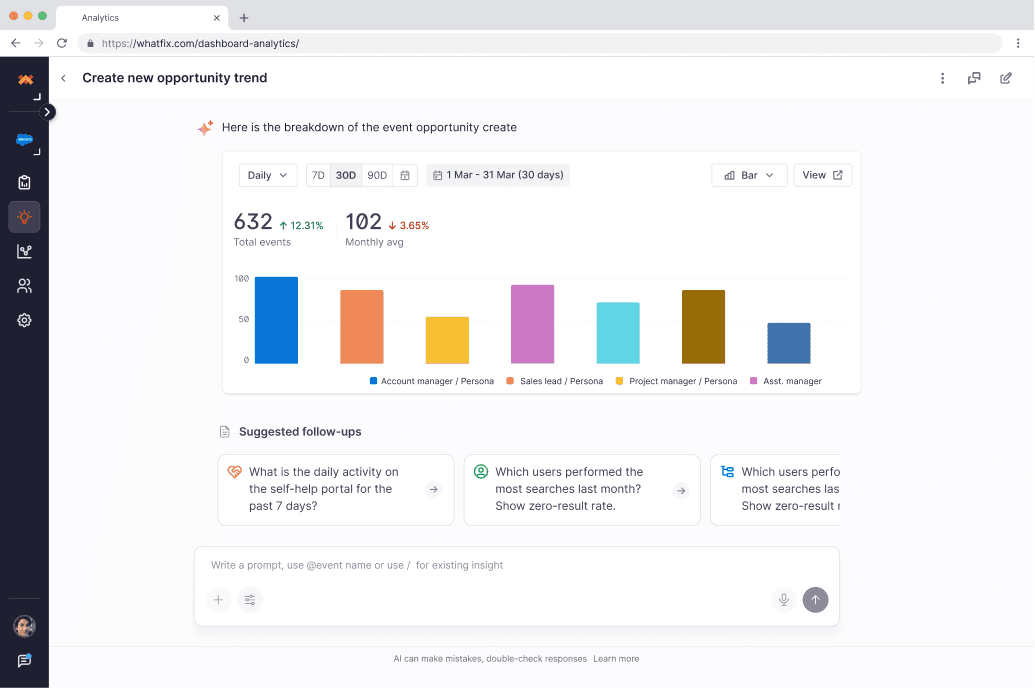
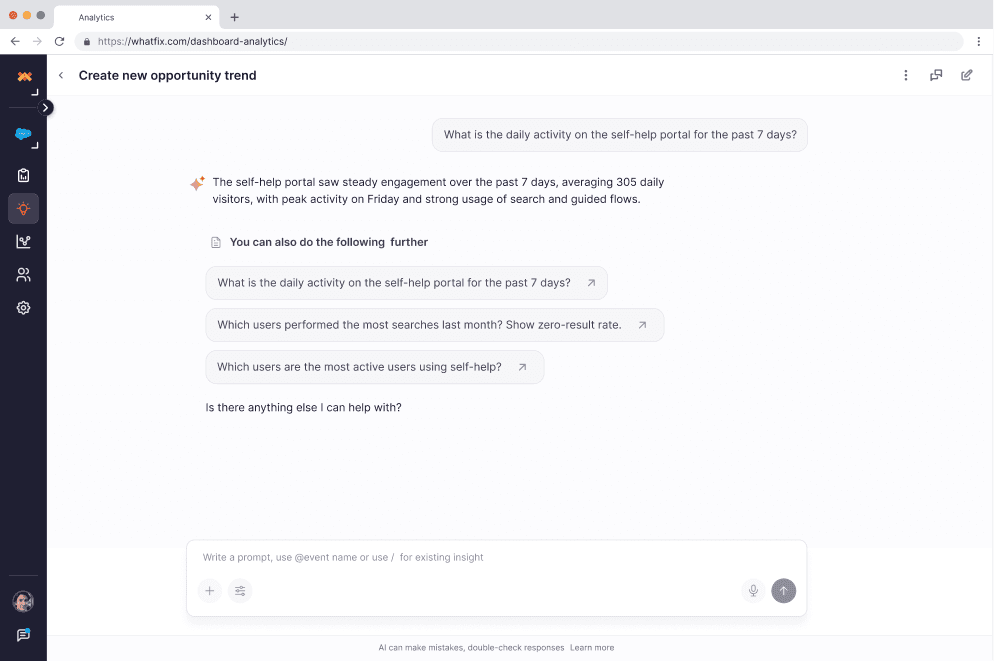
Conversational Follow-ups
You can tag specific events, pages, existing insights, or dashboards directly in your query. This guides the AI to use those exact sources for generating sharper, more focused answers.
Post Question Phase
Post Question Phase
To help users refine results into their desired format and creating opportunities for re-engagement.
To help users refine results into their desired format and creating opportunities for re-engagement.
Quick Refinement Tools
Added visual controls to adjust date ranges, swap event types, add/remove filters, and switch chart types—without retyping questions.
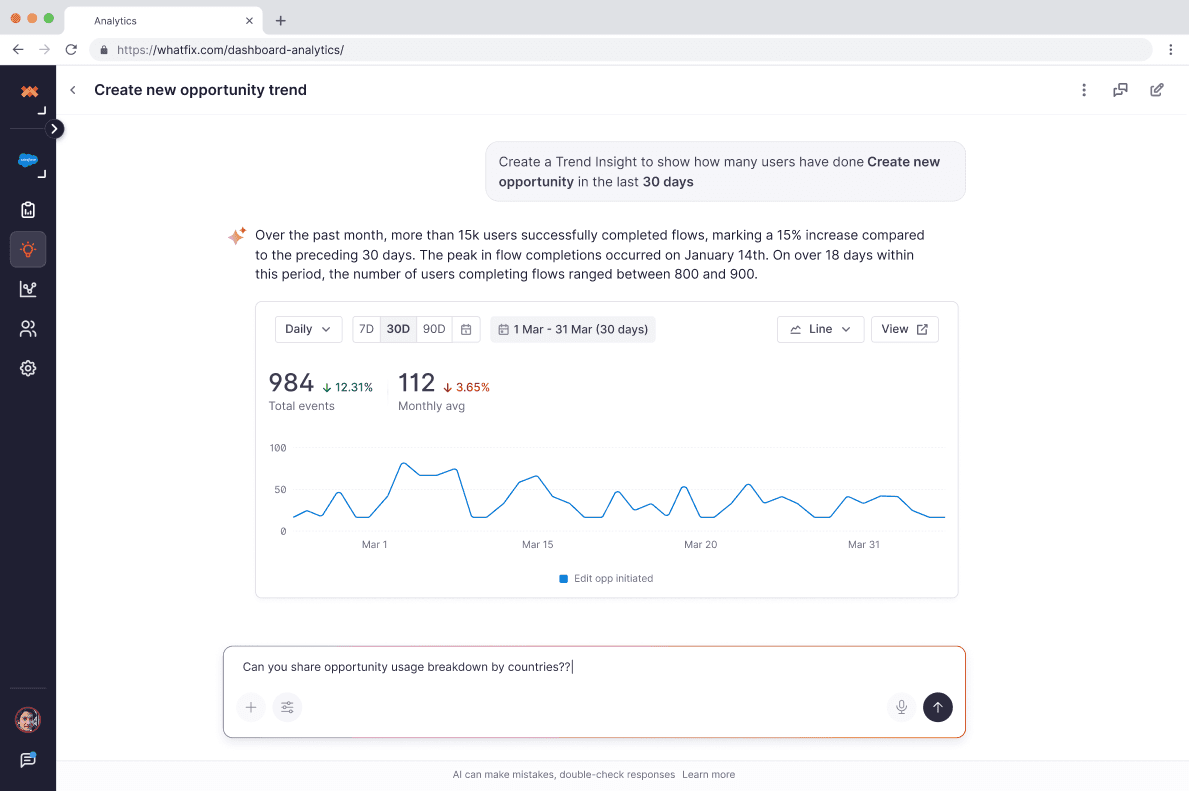
Quick Refinement Tools
Added visual controls to adjust date ranges, swap event types, add/remove filters, and switch chart types—without retyping questions.
Chat History
A toggleable history feature allows you to revisit previous queries and explore your entire analytical journey at any time.
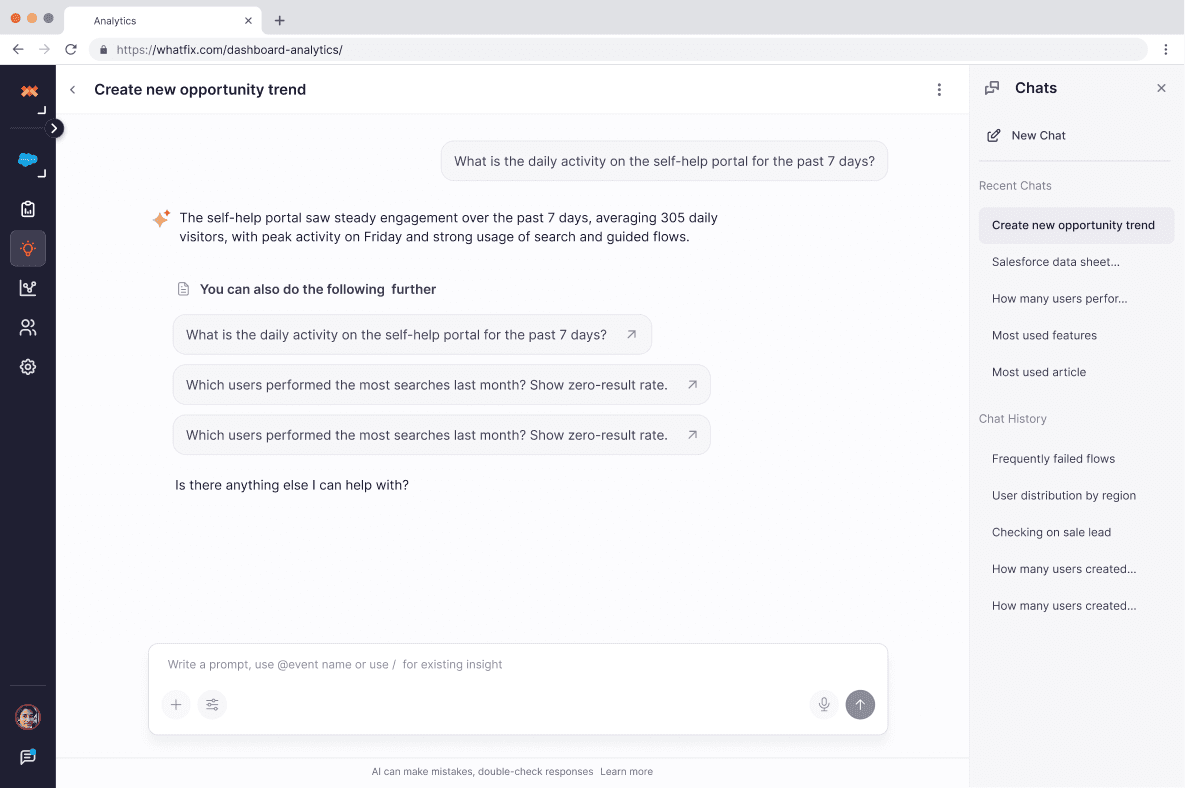
Chat History
A toggleable history feature allows you to revisit previous queries and explore your entire analytical journey at any time.
Defined New AI patterns & Contributed
to Design System
Defined New AI patterns & Contributed
to Design System
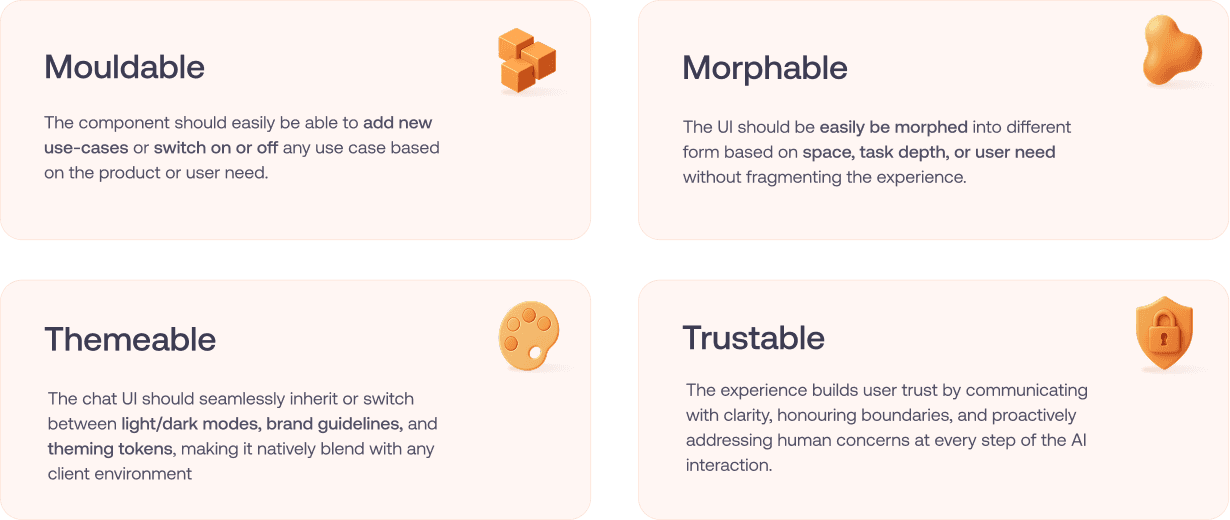
The components
The components
Added visual controls to adjust date ranges, swap event types, add/remove filters, and switch chart types—without retyping questions.
Added visual controls to adjust date ranges, swap event types, add/remove filters, and switch chart types—without retyping questions.
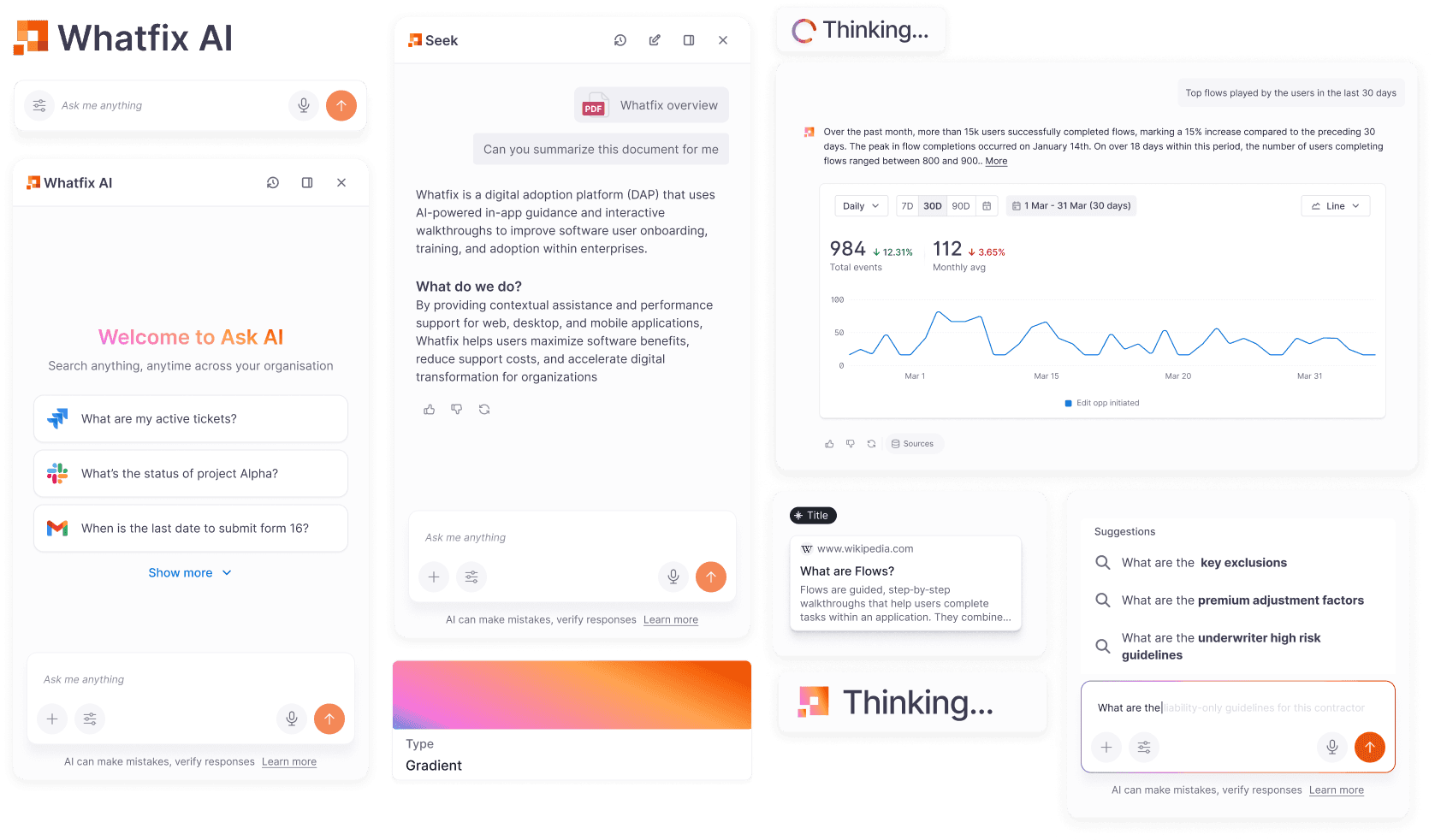
Post-Launch Validation
Post-Launch Validation
After the redesign shipped, I partnered with the research team to test whether it actually closed the trust and comprehension gaps we'd designed for — running a mixed-method study across 28 participants against real analytics questions.
Research approach
Tested two scenarios — specific data queries and broader multi-dataset synthesis — against four quality dimensions: input interpretation, language clarity, explainability, and output readiness.
Key findings
58% of users said they'd act on the AI's response — though most still cross-checked the dashboard first, a sign trust was forming but not yet earned
Explainability, not accuracy, drove usage. Users said "getting intent right" mattered most, but behaviorally, seeing why an answer was correct — its data source, date range, filters — is what got them to act on it
Intent interpretation was the master quality — when the AI misread what a user meant, explainability and output quality broke down with it
Gaps surfaced: text-and-chart mismatches were the biggest trust-breaker even when data was accurate; the AI often answered beyond the asked scope; users wanted clarifying questions instead of silent assumptions; reports needed a consistent summary → breakdown → visual structure.
Next steps
These findings became the criteria for a new set of LLM-judged production evals: explainability, intent interpretation, language clarity, and output readiness: with an 80%+ accuracy threshold set as the bar for production-readiness
Improved dashboard usability across all screen sizes
Increased confidence among non-analytics users in interpreting data
Reduced friction in dashboard scanning and insight discovery
Strengthened internal alignment on dashboards as a decision-making tool, not just a reporting surface
While exact metrics varied by customer, qualitative feedback consistently highlighted:
Faster insight discovery
Better readability
More intentional dashboard creation
Improvements Shipped
Improvements Shipped
Translated the research directly into five product changes, each mapped to a specific trust or explainability gap the study surfaced.
Setup view on charts
A toggle lets users flip any chart into a "setup view," exposing the exact filters and metrics used to generate it — directly answering the explainability gap where users couldn't see what was behind an answer.
Event name visibility
Event names now surface clearly alongside generated answers, closing the terminology gap where users recognized the data but not the system's naming for it.
Reworked report sharing framework
Rebuilt how reports are structured and shared, so a report opens with a summary, breaks down the pattern, and backs it with a visual — matching the shape users said they needed before handing a report to a stakeholder.
Copilot mode
Added contextual input to the chat — multimodal input and point-and-ask — so users can ground a question in what they're already looking at, rather than describing it from scratch. Directly targets the intent-interpretation gap, where vague natural-language prompts were the most common failure point.
Thinking modes
Introduced distinct modes for how the AI reasons through a question, giving users visibility and control over depth of analysis instead of a single black-box response.
Improved dashboard usability across all screen sizes
Increased confidence among non-analytics users in interpreting data
Reduced friction in dashboard scanning and insight discovery
Strengthened internal alignment on dashboards as a decision-making tool, not just a reporting surface
While exact metrics varied by customer, qualitative feedback consistently highlighted:
Faster insight discovery
Better readability
More intentional dashboard creation
Outcome & Impact
Outcome & Impact
With the redesign — validated and refined through this research cycle Ask Whatfix AI moved from a low-retention beta feature to a trusted, daily-use analytics workflow:
20%
Increase in week 1 retention
Users who tried the feature once began coming back, closing the drop-off pattern that defined the beta release.
3X
Growth in questions asked per day, over 6 months
Sustained usage growth, rather than a single-session spike — a sign the trust and guidance gaps were actually closing.
23% → 57%
Shift from manual analytics workflows to AI-assisted ones, as users grew confident enough to let Ask AI do the first pass instead of pulling data themselves.
Together, these mark the shift the redefined problem statement set out to make from a question-answering tool users tried once, to a decision partner they returned to.
Improved dashboard usability across all screen sizes
Increased confidence among non-analytics users in interpreting data
Reduced friction in dashboard scanning and insight discovery
Strengthened internal alignment on dashboards as a decision-making tool, not just a reporting surface
While exact metrics varied by customer, qualitative feedback consistently highlighted:
Faster insight discovery
Better readability
More intentional dashboard creation